Actionable Sales Meetings: 7 Steps to Move Pipeline Faster


Sales teams spend countless hours in meetings every week. Discovery calls, demos, negotiation sessions, internal pipeline reviews - the calendar fills up fast. Yet here's the uncomfortable truth: most of that time investment goes nowhere. Notes get filed away. Action items get forgotten. Forecasts stay stale. The real question isn't whether your team holds enough meetings; it's whether those actionable sales meetings actually move deals forward or just create the illusion of progress.
The gap between "productive meeting" and "pipeline movement" often comes down to what happens in the five minutes after the call ends. When reps scramble to remember key points, manually update CRM records, and chase down colleagues for task assignments, momentum dies. Deals slip. Competitors swoop in. The meeting that felt productive becomes just another calendar entry with nothing to show for it.
This article walks through seven practical steps to transform your sales conversations into genuine pipeline acceleration. By connecting your online meetings with CRM intelligence and task management, you can auto-extract next steps, assign owners, and update forecasts before the coffee gets cold.

Why Most Sales Meetings Fail to Deliver Pipeline Value
Think about the last five sales calls your team held. How many resulted in clear, assigned action items within 24 hours? How many updated the CRM with accurate next steps and revised close dates? If you're like most organizations, the honest answer is disappointing.
The problem isn't lazy reps or bad intentions. Traditional meeting workflows create friction at every turn. Someone has to take notes while simultaneously engaging with the prospect. Those notes then need manual translation into CRM updates. Action items require separate communication to assign owners. By the time all this administrative work finishes - if it finishes at all - the context has faded, and urgency has evaporated.
Actionable sales meetings flip this script entirely. Rather than treating post-call administration as a separate burden, modern workflows capture intelligence during the conversation and distribute it automatically. The meeting itself is the trigger - CRM updates, task creation, and forecast adjustments happen without manual follow-up.
Sales velocity depends on eliminating dead time between customer interactions and internal action. Every hour spent on manual data entry is an hour not spent advancing deals. Every forgotten follow-up is a prospect cooling off. When you design meetings to produce pipeline movement by default, you remove the human bottleneck that slows everything down.
Your Meetings Owe You Pipeline, Not Transcripts
Enter your email address to get a comprehensive, step-by-step guide

Step 1: Connect Your Meeting Platform to Your CRM Foundation
The first requirement for actionable sales meetings is eliminating the gap between conversation and record-keeping. When your online meeting platform integrates directly with your CRM, information flows without manual intervention.
Start by mapping which meeting types should trigger CRM updates. Discovery calls might create or update contact records. Demo sessions could advance opportunity stages. Negotiation meetings might flag deals for manager review. Each connection point removes a manual step from your workflow.
This meeting-to-CRM workflow does more than save time. It captures context that would otherwise get lost. Timestamps, attendee lists, duration, and recording links all attach to the relevant records automatically. When a rep returns to a deal three weeks later, the full history is still available, not buried in their email or memory.
The technical setup typically takes an afternoon for most organizations. Cloud-based platforms handle the heavy lifting through pre-built integrations. Most teams can keep configuration lightweight by choosing a short list of fields that map to their sales motion, leaving custom code for the rare edge cases that truly demand it.
Step 2: Deploy AI-Powered Summaries That Capture What Matters
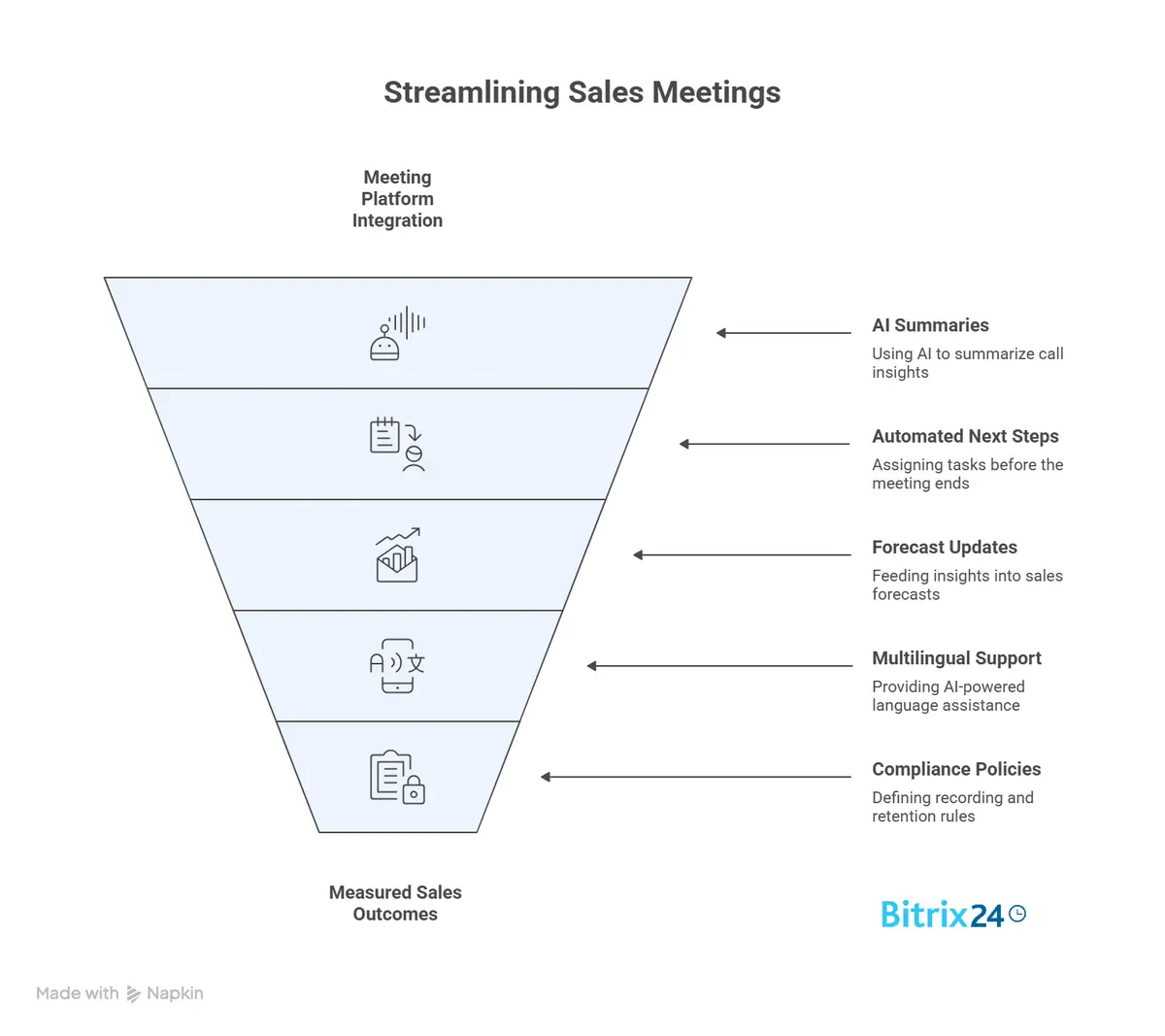
Raw meeting recordings help with compliance and training, but nobody has time to re-watch hours of video. This is where CoPilot summaries transform raw content into usable intelligence.
AI assistants trained on sales conversations can extract the signal from the noise. They identify objections raised, commitments made, pricing discussed, and next steps mentioned. Instead of a 45-minute recording, you get a concise summary highlighting the key moments for deal progression.
Actionable sales meetings warrant this layer of intelligence extraction. The goal isn't documentation for its own sake - it's surfacing the specific information needed to move the deal forward. A good summary tells you what the prospect cares about, what concerns remain unaddressed, and what needs to happen next.
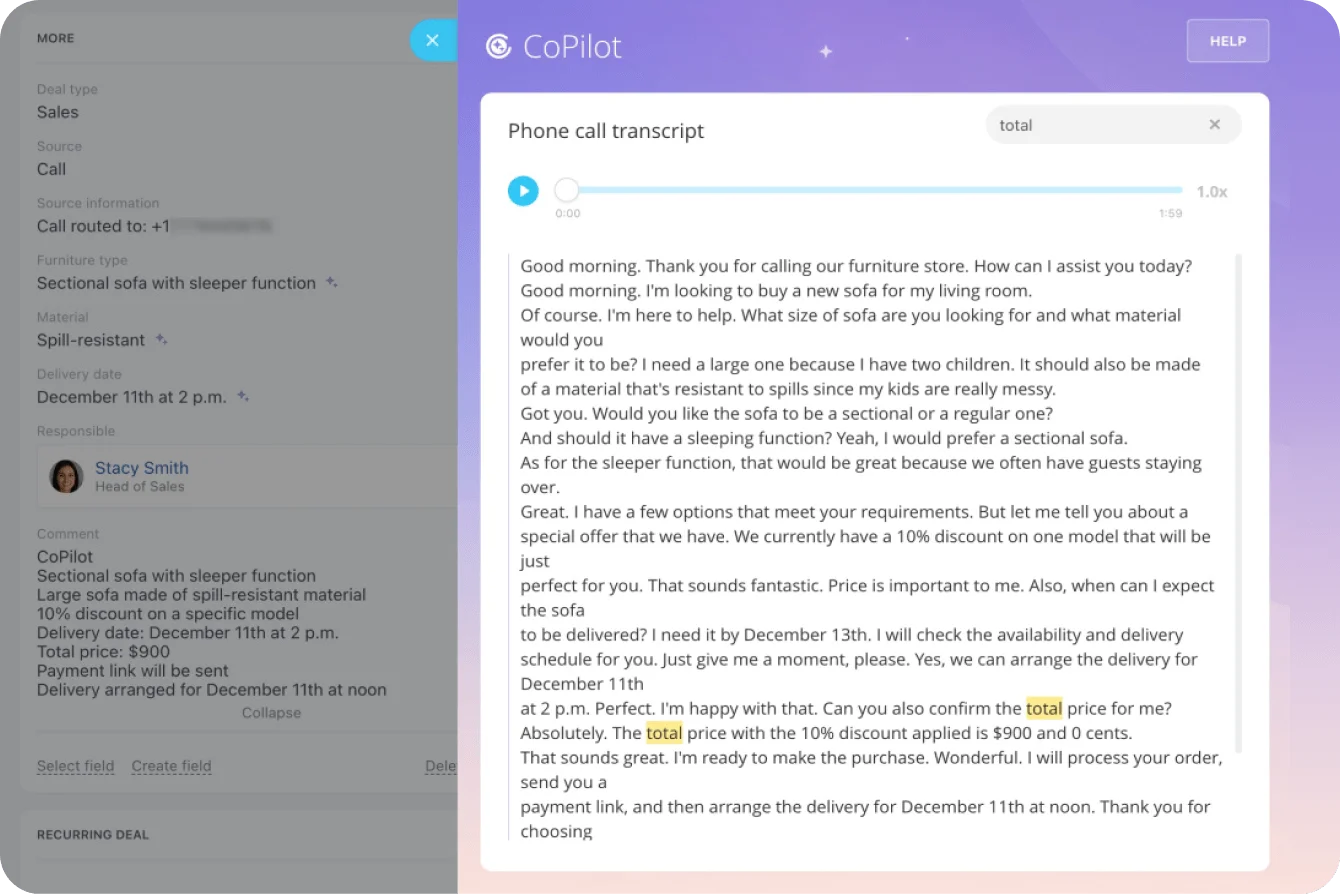
Bitrix24 CoPilot inside the CRM can convert what’s said on a call into structured deal data. Instead of relying on reps to remember and retype everything, CoPilot helps identify and suggest deal signals mapped to the right fields in the record. Objections can be captured in the relevant notes section. Budget discussions can inform deal value updates. Timeline mentions can adjust expected close dates. In parallel, the next steps can be turned into tasks with owners and due dates. The result is simple - after every conversation, the CRM reflects reality with far less manual data entry.
Step 3: Automate Next-Step Assignment Before the Meeting Ends
The most valuable output of any sales meeting is clarity on what happens next. Who does what, by when? Yet this simple question often gets lost in the shuffle of ending calls, moving to the next appointment, and handling inbox fires.
Building next-step assignments into your meeting workflow solves this permanently. When your AI assistant identifies action items during the call, those items can be routed to the appropriate team members with deadlines attached. The salesperson gets a task to send the proposal. The solutions architect receives an assignment to prepare technical documentation. The manager gets flagged for pricing approval.
This automation doesn't just save time - it creates accountability. Tasks with owners and due dates get done at far higher rates than vague meeting notes about things that "should" happen. Your task management system becomes the enforcement mechanism for meeting outcomes.
Actionable sales meetings produce tasks, not transcripts. The distinction matters because tasks drive behavior while transcripts gather dust. When every sales conversation automatically generates assigned work with deadlines, follow-through improvement becomes inevitable rather than aspirational.
Step 4: Build Forecast Updates Into Your Meeting Cadence
Sales forecasts lose accuracy the moment they're created. Every customer conversation reveals new information about deal health, timeline, and likelihood to close. Static forecasts ignore this constant stream of intelligence.
Connecting meeting insights to forecast updates keeps your pipeline view current. When a prospect mentions budget approval during a call, the AI can flag that milestone completion. When a competitor gets mentioned, the risk level can adjust accordingly. When the decision-maker asks about implementation timelines, the close date estimate can shift based on the context.
These forecast updates don't replace human judgment; they inform it. Managers reviewing the pipeline see not just the numbers but the recent conversation context that shapes those numbers. A deal marked at 60% probability means something different when the latest meeting revealed new stakeholders entering the process.
The pipeline lift from better forecast accuracy compounds over time. Reps focus energy on deals with genuine momentum and stop chasing stale opportunities. Managers can coach more effectively when they see what’s actually happening in customer conversations. Executive projections become more reliable when they’re built on current intelligence, not wishful thinking.

Step 5: Handle Multilingual Sales Calls Without Missing Details
Global sales organizations face an additional challenge: important context gets lost when conversations happen in different languages. A critical objection raised in French might not make it into an English CRM if the rep isn't fluent enough to translate nuance accurately.
Modern meeting intelligence tools offer multilingual support that captures and translates conversation content automatically. The German prospect’s concerns appear in your CRM in English. The Spanish customer’s enthusiasm comes through - tone and intent stay intact. The Japanese partnership discussion produces action items in whatever language your team works in.
This capability matters more than many organizations realize. Actionable sales meetings in a global business require consistent extraction of intelligence, regardless of the language used. Without this support, you create two tiers of meeting quality - well-documented English calls and poorly captured international discussions.
Multi-language transcription and summarization have improved dramatically with recent AI advances. Accuracy rates now rival those of human translators in business conversations. The technology handles accents, industry jargon, and cross-cultural communication patterns that would have tripped up earlier systems.
Step 6: Establish Recording Compliance and Retention Policies
The power of meeting intelligence comes with responsibility. Customer conversations contain sensitive information. Recorded calls must comply with jurisdiction-specific consent laws. Storage practices must comply with your industry's regulatory requirements.
Recording compliance starts with notification and consent. Many platforms handle this automatically with announcements when recording begins and options for participants to opt out. Your legal and compliance teams should review these settings to confirm they meet your obligations in each market you serve.
Retention policies determine how long recordings, transcripts, and summaries stay accessible. Some industries need extended retention for audit purposes. Others demand deletion after specific periods to protect customer privacy. Your meeting intelligence workflow needs configurable rules that match these requirements.
Actionable sales meetings built on solid compliance foundations scale confidently. Organizations that skip this step often face costly cleanups later when auditors or regulators ask questions. Spend the time upfront to get policies right, and you avoid those headaches entirely.
Data security extends beyond retention to access controls. Not everyone needs to see every recording. Role-based permissions ensure that sensitive negotiations remain visible only to the appropriate team members while still providing anonymized insights to broader analytics.
Step 7: Measure What Matters Beyond Activity Counts
The final step separates vanity metrics from genuine performance indicators. Counting meetings held tells you nothing about pipeline impact. Tracking the number of tasks created means little if those tasks don’t correlate with closed deals.
Start with conversion metrics that tie meeting activity to outcomes. How does the ratio of calls to closed deals change when you implement actionable meeting workflows? What's the average time from first meeting to signed contract before and after? These comparisons reveal whether your new process actually accelerates revenue.
Sales velocity combines deal value, win rate, sales cycle length, and opportunity volume into a single metric. When meetings become more actionable, velocity should increase because reps spend less time on administrative tasks and more time selling. Cycle times should compress because follow-up happens faster. Win rates should improve because nothing falls through the cracks.
Beyond the numbers, gather qualitative feedback from your team. Are reps finding the automated summaries accurate and useful? Do the auto-generated tasks match what actually needs to happen? Is the forecast intelligence helping managers coach more effectively? This feedback shapes ongoing refinement of your meeting workflows.
Make Every Sales Conversation Pipeline-Ready With Bitrix24
What ultimately separates high-performing sales teams from everyone else isn’t how many meetings they run - it’s what those meetings reliably produce. When conversations consistently result in more up-to-date pipeline data, clearer next steps, and better-informed forecasts, meetings stop being a cost center and start becoming a growth lever. At that point, meeting time isn’t something to minimize - it’s something to optimize for revenue impact.
To get there, the process alone isn’t enough. Teams need workflows that capture what matters during the conversation and help move it into the systems they already rely on - CRM, tasks, and forecasting. When those systems are disconnected, execution slows, and the momentum from the meeting fades into manual follow-up.
Bitrix24 brings these capabilities into one workspace. You can host video calls that log as CRM activities. CoPilot helps surface deal signals, suggest next steps, and fill in deal fields based on conversation context. Tasks can be created and assigned with owners, deadlines, and linked records. From first call to closed deal, everything stays connected in a single system.
The platform supports multilingual transcription and summarization, configurable retention settings, and role-based access controls. This provides compliance teams with the guardrails they need while enabling sales teams to move faster with shared context.
Most organizations can deploy an actionable sales meeting workflow within a single afternoon. No custom development is required. Just configure the relevant connections between meetings, CRM activities, and task management, then start capturing more value from every customer conversation.
Ready to turn your meetings into more consistent pipeline movement? Sign up for Bitrix24 and see how quickly your team can start converting conversations into measurable results.
Revolutionize Your Sales Meetings
Utilize Bitrix24's AI-powered CRM system to transform your sales calls into actionable, pipeline accelerating meetings.
Try Bitrix24 NowFAQs
What KPIs validate actionable sales meetings?
The key KPIs that validate the effectiveness of actionable sales meetings include meeting-to-opportunity conversion rate, average time from first call to closed deal, task completion rate for meeting-generated action items, and forecast accuracy improvements. Beyond activity metrics, focus on outcome measures such as changes in sales velocity and win-rate trends. Comparing these metrics before and after implementing your meeting intelligence workflow reveals the actual pipeline impact rather than just tracking how many meetings occurred.
How fast can we roll out actionable sales meetings to a 50-rep org?
Rolling out actionable sales meetings to a 50-person sales organization typically takes one to two weeks for full deployment. The technical configuration - connecting meetings to CRM and task management - often completes in a single afternoon. The remaining time goes toward training reps on new workflows, configuring role-based permissions, and establishing your retention and compliance policies. Most teams see productivity gains within the first week as reps adapt to automated task creation and AI-generated summaries.
How does CoPilot map tasks in actionable sales meetings to CRM fields?
CoPilot maps tasks from actionable sales meetings to CRM fields by analyzing conversation content for specific trigger phrases and contexts. When prospects mention timelines, budgets, decision-makers, or next steps, the AI identifies these moments and extracts structured data. This information then populates the relevant CRM fields - updating close dates based on timeline discussions, adjusting deal values when pricing comes up, or creating linked tasks when action items get mentioned. The mapping logic is configurable to match your specific sales process and field structure.
Does this support multilingual transcripts and summaries?
Modern meeting intelligence platforms support multilingual transcripts and summaries across major business languages. Conversations in German, French, Spanish, Japanese, Portuguese, and many other languages are transcribed accurately and summarized in your team's working language. This capability matters for global sales organizations where customer conversations occur in local languages, but CRM records and internal communication must remain consistent. Accuracy rates have improved substantially with recent AI advances, which now handle accents and industry-specific terminology effectively.
How do we secure recordings and comply with retention policies?
Securing recordings and complying with retention policies involves configuring notification settings for recording consent, establishing storage duration rules aligned with your regulatory requirements, and implementing role-based access controls to limit who can view sensitive conversations. Most platforms offer automated consent announcements, configurable retention periods, and permission structures that satisfy common compliance frameworks. Work with your legal and IT teams during initial setup to ensure policies align with applicable GDPR, CCPA, and industry-specific regulations.