6 Innovative Features Your CRM System Needs


Most CRMs quietly turn into expensive address books. People log in, update a few fields, and the real work, chasing the follow-up, digging up the last conversation, deciding who owns the angry customer, still happens somewhere else.
A CRM worth paying for coordinates that work instead of just recording it. The problem was never contact storage; it's operational coordination: routing inquiries, triggering the next action, holding context from first touch to renewal.
Six features decide whether a CRM does that or not: sales automation, analytics, omnichannel communication, AI assistance, unified customer profiles, and built-in collaboration.
Each one is worth judging on what it changes about how work actually moves, not on whether it appears on the spec sheet.
What makes a CRM feature essential today
Plenty of products advertise long capability lists, but much of that gets used rarely or only covers edge cases.
The features that pull weight sit close to the core flow of work, lead intake, response, handoffs, forecasting, follow-up, and they tend to do three things:
- Cut manual effort, so execution doesn't depend on who happens to be least busy that day.
- Speed up response, since slow follow-up loses deals and irritates customers.
- Connect teams around a shared customer view, so nobody starts from scratch.
A capability that doesn't help with at least one of those is ‘nice to have’, not ‘need to have’. Scale is the test: something that works for one rep but breaks across multiple teams, channels, or regions isn't doing much.
Why they affect business performance
These six affect business results you can measure:
- Faster, more consistent lead handling: When inbound requests sit unassigned, or follow-ups depend on a rep remembering, conversion drops because the operating model is slow, not because the offer is weak. The cost is well documented: Harvard Business Review's audit of 2,241 U.S. companies found the average response time was 42 hours, and 23% of companies never responded at all, while firms that responded within an hour were close to seven times more likely to qualify the lead than those that waited an hour longer.
- Shorter sales cycles: Reps lose time updating multiple systems, hunting for interaction history, or asking a colleague for account context. Unified records, reporting, and collaboration remove that waste. None of it creates demand; it just stops slowing revenue teams down.
- Stronger retention: Service quality depends on continuity. If account managers and agents can't see prior conversations across channels, the experience turns repetitive and inconsistent, which surfaces later as escalations and churn.
- A sharper leadership view: Companies increasingly compete on responsiveness and consistency, so disconnected tools and manual follow-up become a measurable liability rather than a minor annoyance.
Reading CRM software through these six shifts evaluation toward business impact instead of feature-count theater.
CRM Feature ROI Scorecard: Prioritize Upgrades in 30 Minutes
Enter your email address to get a comprehensive, step-by-step guide

How CRM value is created across the customer lifecycle
A CRM creates value when customer data moves instead of sitting still. In practice, that means:
- Lead capture feeds assignment automatically.
- Communication updates the record on its own, without manual logging.
- Deal progression triggers the next task, alert, or approval.
- Reports reflect what teams actually did, not what someone remembered to log on Friday.
That connected flow turns a repository into an operating model: a lead arrives, gets routed, gets a response, enters a pipeline, generates activity, and rolls up into reporting, with each stage feeding the next.
Bitrix24 builds these as connected functions in one platform rather than bolt-on utilities, and that matters more than it sounds.
When communication, workflow logic, records, and task coordination live in separate products, teams hit sync problems, inconsistent data, and slow adoption.
Integration affects speed, trust in the data, and how much of the CRM gets used at all.
The 6 CRM features your system needs
Each maps to a recurring operational problem. Here's who uses each one, how often, and where it tends to break.
1. Sales automation and workflow rules
Sales automation is the clearest productivity lever in most CRMs. Sales teams repeat the same actions all day: assigning leads, setting reminders, sending follow-ups, advancing deal stages, requesting approvals, escalating stalled deals. When those depend on memory, quality swings with each rep's workload.
A sales team tracking deals in a shared spreadsheet will usually find that follow-ups happen only when someone remembers them, and the busiest rep forgets the most.
Automation rules, triggers, and robotic workflows in Bitrix24 handle those routine steps automatically based on events or stage changes, so consistency becomes a system behavior rather than a management aspiration.
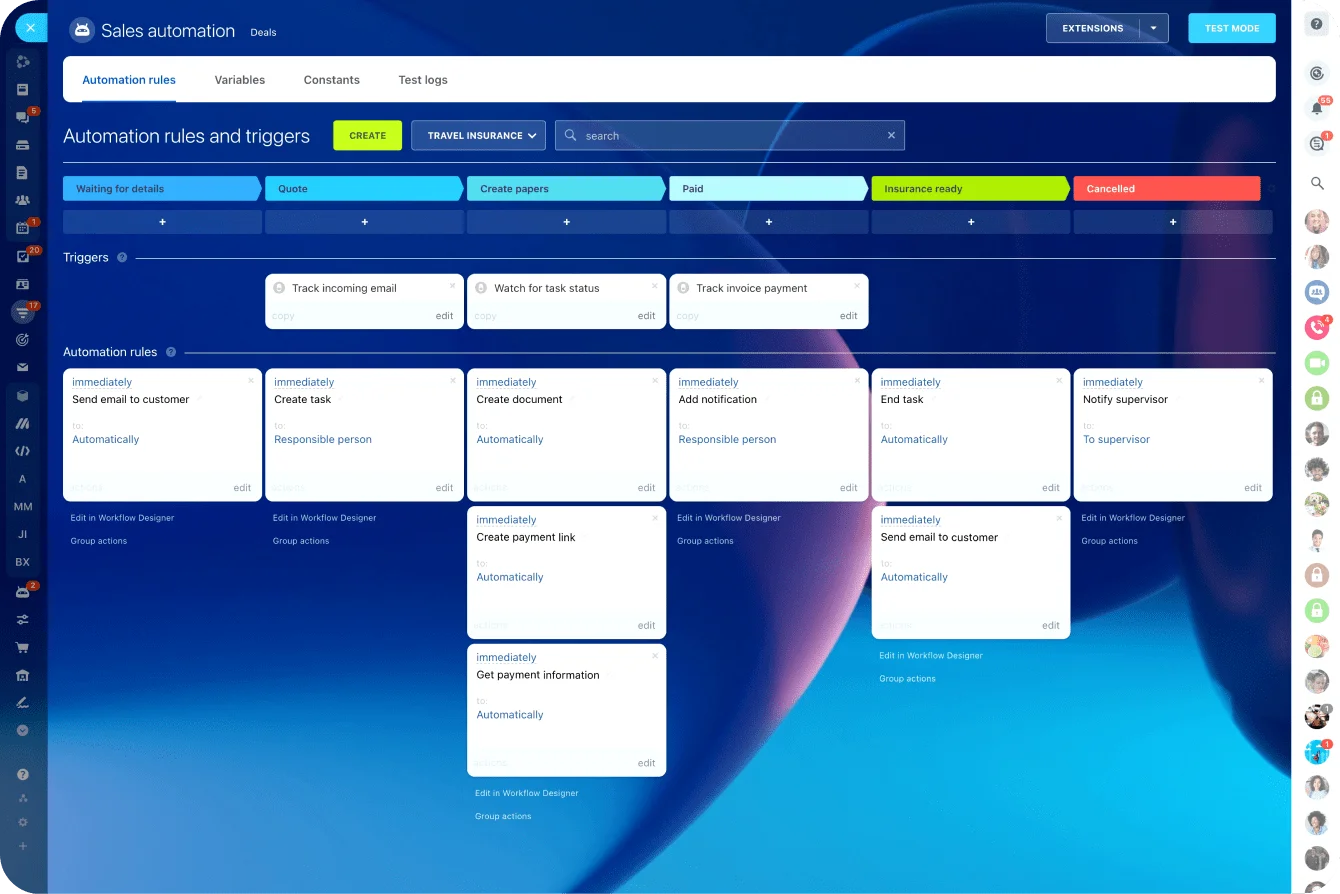
Automation has a hard limit, though. McKinsey Global Institute estimates that roughly a third of sales and sales-operations tasks can be automated with current technology. The other two-thirds (judgment, relationship-building, negotiation) still belong to people.
2. Advanced analytics and reporting dashboards
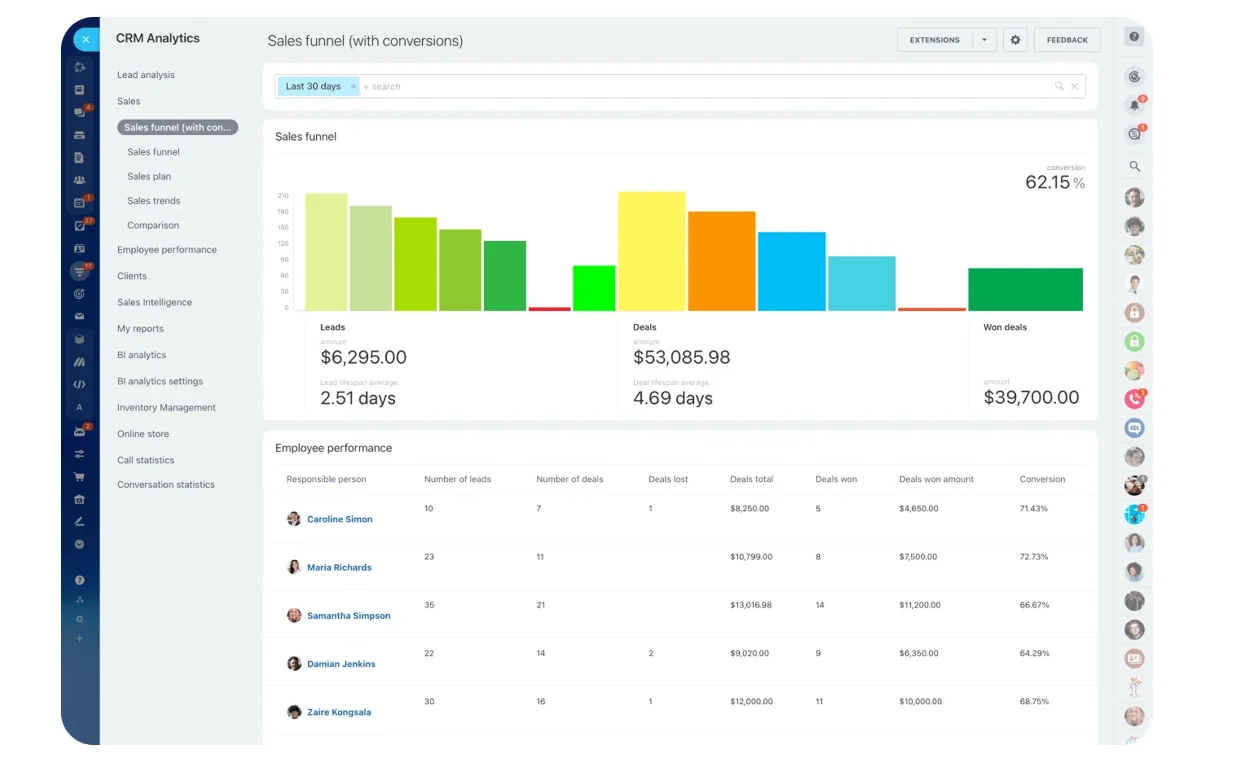
Raw CRM data only helps when teams can read it fast. Managers need conversion rates, funnel leakage, pipeline health, activity levels, campaign impact, and revenue trend without rebuilding the same report every month. A sales manager who exports deals to a spreadsheet every Monday morning is spending an hour on something the system should show in real time.
Bitrix24 covers this with CRM analytics and dashboards that surface those patterns. Beyond hindsight reporting, the real value is catching problems early, when a pipeline slows, lead quality dips, or output shifts.
3. Omnichannel communication hub
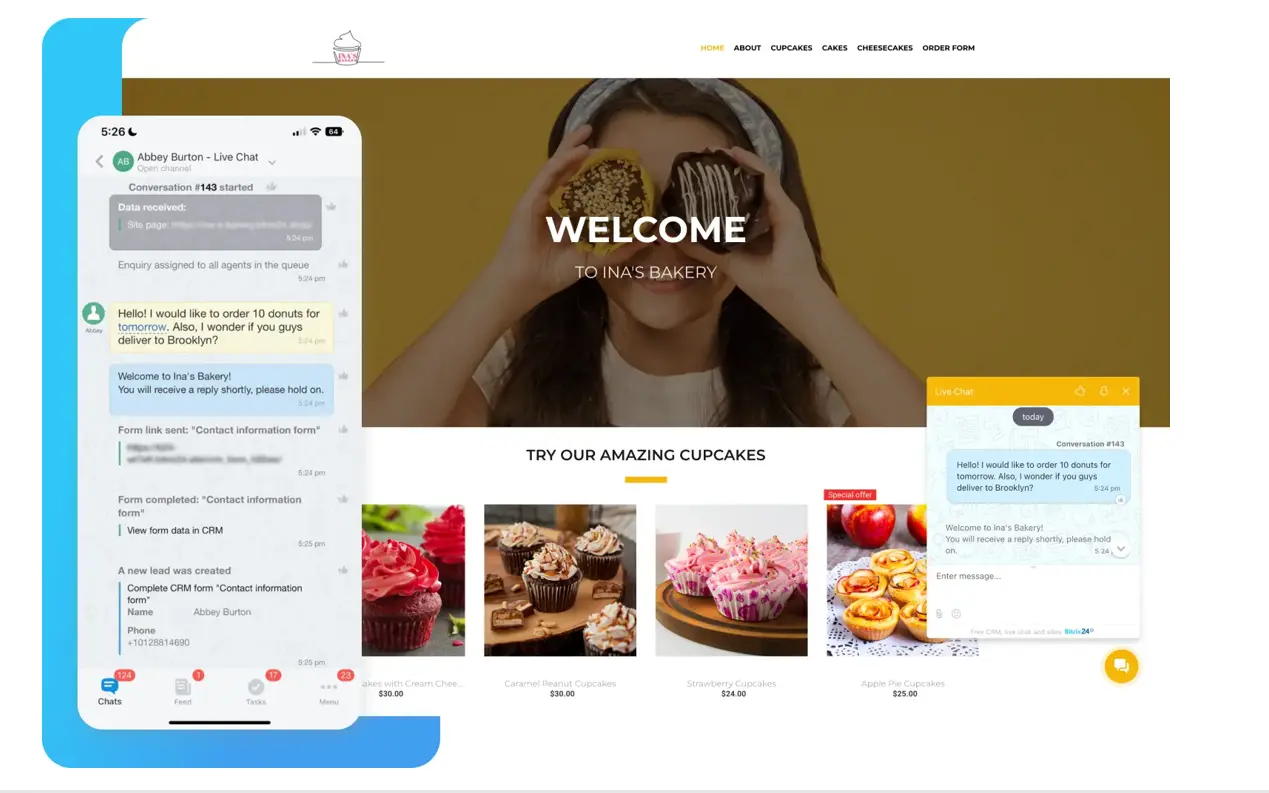
Omnichannel means conversations from email, phone, live chat, social messaging, and web forms run inside one coordinated environment. That's more than offering many contact options. The gain comes from unified history, routing, and clear ownership.
A support team running email, a website chat widget, and a business WhatsApp number as three separate inboxes will answer the same customer twice and contradict itself at least once. It's a common failure. In Pega's global study of 12,700 customers, agents, and leaders, repeating the same information across channels ranked as the top frustration.
Bitrix24 handles this through its Contact Center and integrated channels, keeping history and ownership in one place as inbound volume grows.
4. AI-assisted lead and deal management
AI in CRM earns its place by cutting handling time and improving prioritization. Used as a gimmick, it just adds noise. It helps when the system can summarize an interaction, support data handling, or surface where effort should go first.
Bitrix24 adds AI-powered tools (CoPilot) for that kind of routine work, like faster review of account history and quicker movement from information to action.
Where it goes wrong: teams point AI at messy data and expect clean output. A summary built on half-logged activity is confidently wrong. Which is worse than no summary at all!
5. Centralized customer data and 360-degree profiles
A usable customer record combines contact details with purchase history, interactions, files, open work, and account context. Otherwise people still hunt across systems to understand a single customer. A B2B rep prepping for a renewal call typically opens the CRM, then a separate inbox, then a chat tool, just to reconstruct what happened over the last quarter.
Bitrix24 CRM profiles give sales, service, and account teams one shared view of the customer. This matters most when several people touch an account over time and need continuity without repeated handoffs.
6. Built-in collaboration and task coordination
Customer work usually breaks down after the conversation. A deal needs pricing approval, a service issue needs engineering input, a renewal needs coordination across functions. If those actions live outside the CRM, execution slows and visibility drops.
Bitrix24 keeps that work attached to the customer record: tasks, approvals, and internal chat tied to the deal or ticket they belong to, so the pricing sign-off or engineering input happens where everyone can see it instead of in a side thread.
This matters most when closing or resolving something depends on people who don't own the account but have to act on it.
|
Feature |
Operational problem it solves |
Bitrix24 implementation |
|---|---|---|
|
Sales automation |
Manual follow-up, inconsistent execution |
Automation rules, triggers, robotic workflows |
|
Advanced analytics |
Poor visibility into performance and forecasting |
CRM analytics, reports, dashboards |
|
Omnichannel communication |
Fragmented customer conversations |
Contact Center, integrated communication channels |
|
AI-assisted management |
Slow prioritization and high admin load |
AI-powered assistance (CoPilot), workflow support |
|
360-degree customer profiles |
Scattered account context across tools |
Centralized CRM records and shared profiles |
|
Collaboration and coordination |
Execution gaps between customer-facing and internal teams |
Integrated chat, tasks, calendars, approvals |

Common mistakes when evaluating or using CRM features
- More features doesn't mean more value: A CRM can ship dozens of modules and still underperform if automation, analytics, and communication don't connect; fragmented functionality just creates more manual bridging work.
- Omnichannel isn't a channel count: Being present on many platforms means nothing if history is split by channel, ownership is unclear, and routing is weak. Customers feel it at once, they repeat themselves, wait longer, and get different answers depending on where they ask.
- Dashboards are only as good as the data: Reporting quality depends on consistent capture. If reps use deal stages differently, skip logging activities, or track lead sources unevenly, the analytics look polished while telling the wrong story, and automation built on that data fires at the wrong time or not at all.
- Software won't fix unclear ownership: If nobody knows who should respond, approve, or escalate, the system just exposes the confusion faster.
Real-world use cases for these capabilities
B2B sales
These features show up first as time savings and pipeline discipline.
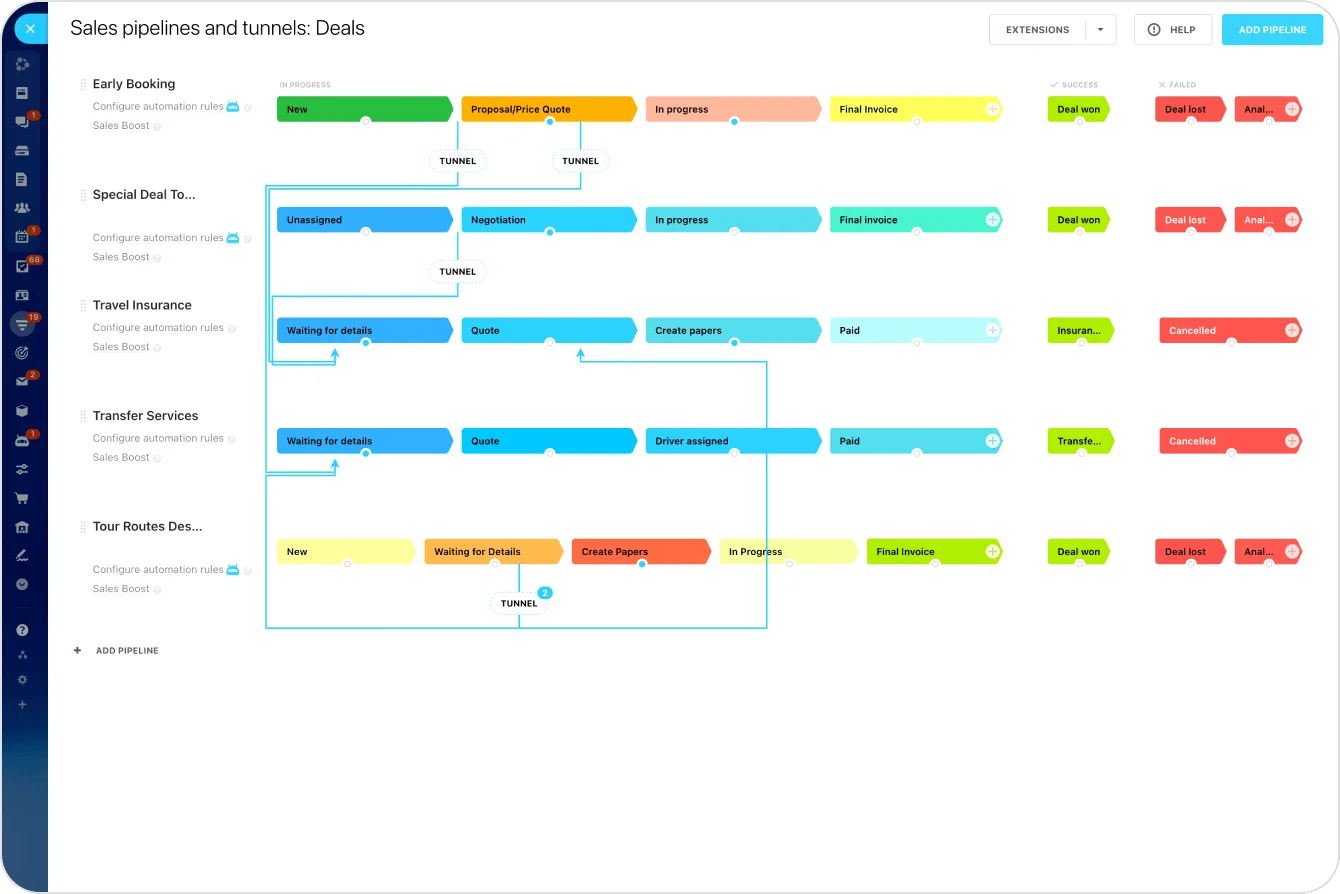
A team handling inbound and outbound can assign leads by territory or product line, trigger reminders after demos, and move deals through standard stages.
Unified records give reps account context before a call, and reporting shows managers which deals are aging, which channels produce qualified pipeline, and where coaching is needed.
Customer service and account management
Here the priority is continuity and resolution speed.
Omnichannel keeps email, chat, and phone in one record. Collaboration matters when an issue needs cross-functional input (billing review, technical investigation, contract clarification), so the team works from the customer record with internal tasks attached instead of rebuilding the issue elsewhere.
Marketing and revenue operations
These teams lean on the visibility layer. Dashboards and attribution reporting show which campaigns produce usable demand, where lead quality drops, and how cleanly leads hand off to sales. AI-assisted support trims some of the lead-review and data-cleanup work, freeing time for channel and funnel analysis.
These are everyday situations in growing companies, where interactions are frequent, ownership shifts between teams, and performance depends on how well the system coordinates that movement.
Operational impact, scale, and where the limits appear
As organizations grow, these features matter more because they standardize execution.
What runs informally for five people breaks at fifty: a manager can't track every follow-up by hand, people in different locations can't rely on hallway conversations for context, and rising volume makes fragmented channels and manual routing expensive.
What scale actually buys you
The payoff at that point is concrete:
- Automation improves SLA (service-level agreement) adherence, because responses trigger consistently instead of when someone remembers.
- Analytics supports cleaner forecasting, because leaders spot patterns earlier and compare teams on the same basis.
- Centralized records speed up onboarding, since new hires learn from visible process history instead of tribal knowledge.
There's also less dependence on individual memory. Which sounds minor, but isn't. When customer work lives in people's heads, turnover, absence, or simple overload turns into service gaps and pipeline slippage.
Where the software stops
The limits are equally real. None of this fixes poorly defined processes. Vague stage definitions, disputed ownership, or inconsistent usage produce weak results on any platform.
Data quality is the same story: automation on bad data scales mistakes faster, and analytics drawn from inconsistent usage won't support confident decisions no matter how clean the dashboard looks.
The software reinforces a good system; it can't invent one.
Where Bitrix24 fits
That's the real test when you're comparing CRMs. Not how many features sit on the spec sheet, but whether they connect the work — intake to response, deal to delivery, first touch to renewal — so the system coordinates what your team does instead of just recording it.
Bitrix24 builds these six as connected functions rather than bolt-ons, which is what lets a growing team add volume without losing the thread.
Start for free, or compare the pricing plans to see what each tier includes.
Turn Your CRM Into a Sales Coordination Hub
Bitrix24 unites CRM automation, omnichannel communication, AI, analytics, tasks, and customer profiles to speed follow-ups and handoffs.
Start TodayFAQ: choosing and using modern CRM features
Which CRM feature usually delivers value fastest for small and midsize businesses?
Automation, because it removes repetitive work right away. Lead assignment, reminders, and follow-ups can be standardized without an organizational redesign, so the time savings show up early.
Do omnichannel tools matter if most leads still come through email and phone?
Yes. Channel mix tends to widen over time, and a unified record keeps history from fragmenting as new channels appear. It also improves internal visibility today, well before the channel mix grows.
Can CRM analytics work well without standardized processes?
Only up to a point. Reporting quality depends on consistent stage definitions, data-entry logic, and shared usage. Without that, dashboards can still look useful while supporting weaker forecasting and less reliable decisions.