Startup Budgeting for Growth Tools: Spend Where Handoffs Break


Most startups waste tool budget on the wrong problem. They buy platforms because a rep complains about data entry, or an investor asks about forecasting, or a competitor uses it. But 70% of CRM projects fail because of something much simpler: misaligned handoffs between teams.
A handoff is the moment responsibility, information, or next action moves from one person to another. A lead comes in but sits unassigned. A deal closes but onboarding doesn't start. Finance invoices from one spreadsheet while customer success works from another.
These gaps don't show up in feature lists. They show up in revenue drag.
So the best early tool budget doesn't fund the broadest platform or the loudest request. It funds the transitions where work gets lost: lead routing, customer activation, project ownership, approvals. This article shows you how to find those breaks and fund only the smallest tool layer that fixes them, so you spend less while scaling faster.
What 'budgeting for growth tools' means in a startup context
In a startup, budgeting for growth tools means prioritizing software spend based on operational breakdowns that block revenue, delivery, or visibility. It's not about giving each department its own wishlist budget. It's about funding the places where the business can't scale cleanly with current processes.
A handoff can take several forms:
- Lead routing from marketing to sales
- The transition from closed-won to onboarding
- Task ownership moving from founder to operator
- An approval chain for discounts, contracts, or invoices
- Reporting transfers, where one team depends on another system to produce a number they need to act on
What matters is whether a missed or messy transition causes measurable drag.
This is also different from broad cost cutting. You're not trying to slash software line items just to save money. And you're not trying to build a full enterprise stack before the company's earned that complexity. The goal is narrower: spend enough to make critical workflows repeatable, visible, and less dependent on memory.
Useful rule: if a tool doesn't improve a recurring transition in your revenue or delivery flow, it's probably not a growth-priority purchase yet.

Why startup tool budgeting breaks down before teams notice
Early on, a lot of process lives in founders' heads. That works for a while because the volume is low and the founder knows the history behind every customer, deal, and exception. The trouble starts when demand rises. The founder can no longer manually bridge every gap, but the business still acts as if that invisible coordination layer exists.
Each team optimizes locally
At the same time, each team tends to optimize its own local pain:
- Marketing wants better campaign reporting
- Sales wants cleaner pipeline views
- Delivery wants project templates
- Finance wants invoicing controls
All of those may be valid. But when nobody owns the gaps between those functions, the budget gets pulled toward individual productivity instead of cross-functional reliability.
Why budget decisions go wrong
That's why tool decisions often follow the loudest pain rather than the biggest business risk:
- A rep complains about data entry, so the team buys automation
- A founder sees a competitor's stack on LinkedIn and copies it
- An investor asks about forecasting, so the company buys analytics before fixing source data
- A free trial solves one visible annoyance and gets approved without asking whether it addresses a repeatable breakdown
The result is familiar: more tools, more subscriptions, and the same dropped follow-ups, unclear ownership, and slow approvals underneath.
Growth Tool ROI Scorecard: Prioritize Spend By Handoff Risk
Enter your email address to get a comprehensive, step-by-step guide

Step 1: Map the critical handoffs in your revenue and delivery flow
Start small. You don't need a giant operations diagram. You need a clear map of the few transitions where money, customer experience, or execution quality is most exposed.
For most startups, that list includes moments like these:
- Inbound lead received
- Lead qualified and assigned
- Deal moved to proposal or contract
- Customer marked closed-won
- Kickoff scheduled and onboarding started
- Project enters delivery
- Invoice approved and sent
- Renewal or expansion review triggered
For each handoff, write down three things: who owns the transition, what system is used, and what information must move with it. Keep it concrete. "Sales to CS" is too broad. "Closed-won in CRM triggers onboarding owner assignment, kickoff date, package sold, billing contact, and implementation notes" is useful.
A simple table works well here:
|
Handoff |
Current Owner |
System Used |
Info That Must Move |
|---|---|---|---|
|
Inbound lead to sales |
Growth lead |
Website form + inbox |
Source, contact details, lead type, urgency |
|
Closed-won to onboarding |
Account executive |
CRM + spreadsheet |
Scope, start date, contacts, pricing, promises made |
|
Project completion to invoicing |
Delivery manager |
PM tool + accounting software |
Deliverables approved, billing milestone, PO info |
What to focus on
Don't document every internal workflow. Focus on the paths that directly affect pipeline movement, customer activation, delivery start, cash collection, or renewals. Three to six core handoffs is enough to start.
If the handoff doesn't affect revenue, delivery speed, or accountability, it can wait.
Step 2: Find where drops, delays, and rework actually happen
Once you've mapped the handoffs, look for evidence of failure. Not assumptions. Not stories from six months ago. Review recent examples from the last 30 to 60 days.
What to look for
Pull a small sample of real cases and ask simple questions: Which leads weren't followed up on quickly? Which customers had to repeat information after signing? Which projects stalled because approval was unclear? Which invoices went out late or with errors?
The signals don't need to be sophisticated. In early-stage teams, basic measures tell you plenty:
- Response lag after form submission
- Conversion drop between stages
- Days from close to kickoff
- Manual status updates per deal or project
- Approval turnaround time
- Billing corrections or delayed invoices
Separating signal from noise
You're trying to separate random mistakes from repeatable operational failure points. One account executive forgetting a note once isn't necessarily a tooling problem. Five closed-won customers in a month entering onboarding with missing scope details probably is.
A good test: if the same issue appears across people, weeks, or accounts, and the current process depends on memory or manual copying, it's likely a candidate for tool support.
A common pattern: when handoffs silently cost revenue
Here's a breakdown that shows up constantly. A deal closes —the customer's signed, the AE marks it won in the CRM— and then nothing happens for two weeks. The close didn't trigger anything for the onboarding team, because onboarding lives on a separate board nobody checks automatically. The founder eventually notices and forwards the deal by hand.
Meanwhile, the customer sits there, freshly signed and unsure what comes next.
That delay rarely kills the deal outright. It seeds churn: the customer's first post-sale experience is confusion, and implementation quality suffers from the rushed catch-up once someone finally notices.
The fix usually isn't a new tool. It's a workflow that creates an onboarding task the moment the CRM status changes, assigns it to the onboarding owner, and carries the contract details across. The kind of thing a team can stand up in a weekend, that quietly removes days from the handoff.
Document your findings
Keep a short issue log with examples:
- 3 inbound demos sat over 24 hours because form notifications went to one inbox
- 2 customers were onboarded to the wrong package because contract details weren't transferred to delivery
- 4 invoices were delayed waiting for project sign-off buried in email threads
That log is what you score in the next step — real cases, not the loudest complaint.

Step 3: Score each breakdown by revenue risk, frequency, and fixability
Not every bad handoff deserves immediate spend. Some are annoying but low impact. Others are painful but too complex to solve right now. This is where lightweight scoring helps.
Rank each issue using three lenses:
Revenue risk: how much pipeline, cash flow, or customer trust is exposed?
Frequency: how often does this happen?
Fixability: can a tool realistically solve most of it with your current team capacity?
Use a simple 1-to-5 scale for each. Then total the score. The point isn’t mathematical precision, it’s to stop tool debates from turning into opinion contests.
|
Breakdown |
Revenue Risk |
Frequency |
Fixability |
Total |
|---|---|---|---|---|
|
Leads not assigned quickly |
5 |
4 |
5 |
14 |
|
Onboarding notes missing after sale |
4 |
4 |
4 |
12 |
|
Custom reporting built manually |
2 |
5 |
2 |
9 |
The fixability lens matters more than teams expect. A problem may be expensive, but if solving it requires a six-tool rebuild, custom development, and heavy process change, it may not be the first place to spend. In contrast, a high-frequency issue with an easy routing or automation fix can pay back quickly.
If two items score similarly, prioritize the one closer to revenue movement or customer activation. Those tend to create the clearest return fastest.
Quick filter: high risk + high frequency + simple implementation usually beats high-complexity "strategic" tooling every time in an early-stage startup.

Step 4: Choose the smallest tool layer that stabilizes the handoff
Now match the breakdown to the minimum solution that gives the handoff structure, visibility, or routing. This is where many startups overspend. They buy a full suite when the real need is one clean transition.
Match the problem to the minimum solution
Some examples:
- If inbound leads are getting lost: you may need CRM assignment rules, a shared inbox, or basic response alerts. Not a massive marketing automation platform.
- If sales-to-CS context is inconsistent: you may need a required handoff form, CRM workflow, or structured onboarding intake. Not a full-blown professional services platform.
- If approvals are slow: a simple approval workflow tool or standardized request path may do more than a large project suite.
- If delivery starts with poor visibility: a lightweight project intake layer tied to your source system may be enough.
The right question is not "What platform can do the most?" It's "What's the smallest layer that makes this transition dependable?"
Before you approve the spend
Check three things:
Setup burden: how much work is required to configure fields, workflows, and permissions?
Adoption friction: will the people involved actually use it every time?
System compatibility: does it connect to the tools where the upstream and downstream work already happens?
A cheap tool that creates one more manual sync point isn't cheap. A feature-rich platform that no one updates isn't infrastructure. Small, well-fitted layers usually outperform ambitious stack decisions at this stage.
The right-sized solution
Take a common version of this. A sales team is drowning in manual CRM updates: deal context arrives as email threads, Slack messages, and calendar invites, and none of it lands in the pipeline tool. The obvious move is to buy an AI data-capture platform for a few hundred a month to auto-populate the CRM.
The smaller fix usually wins.
A workflow in Bitrix24's CRM automation can create records from inbound emails to a dedicated address, pull key fields from the subject line, turn a Slack message into an "add to deal" action, and let calendar invites set expected close dates. No new license, no new tool to learn, and reps adopt it because it meets them where they already work.
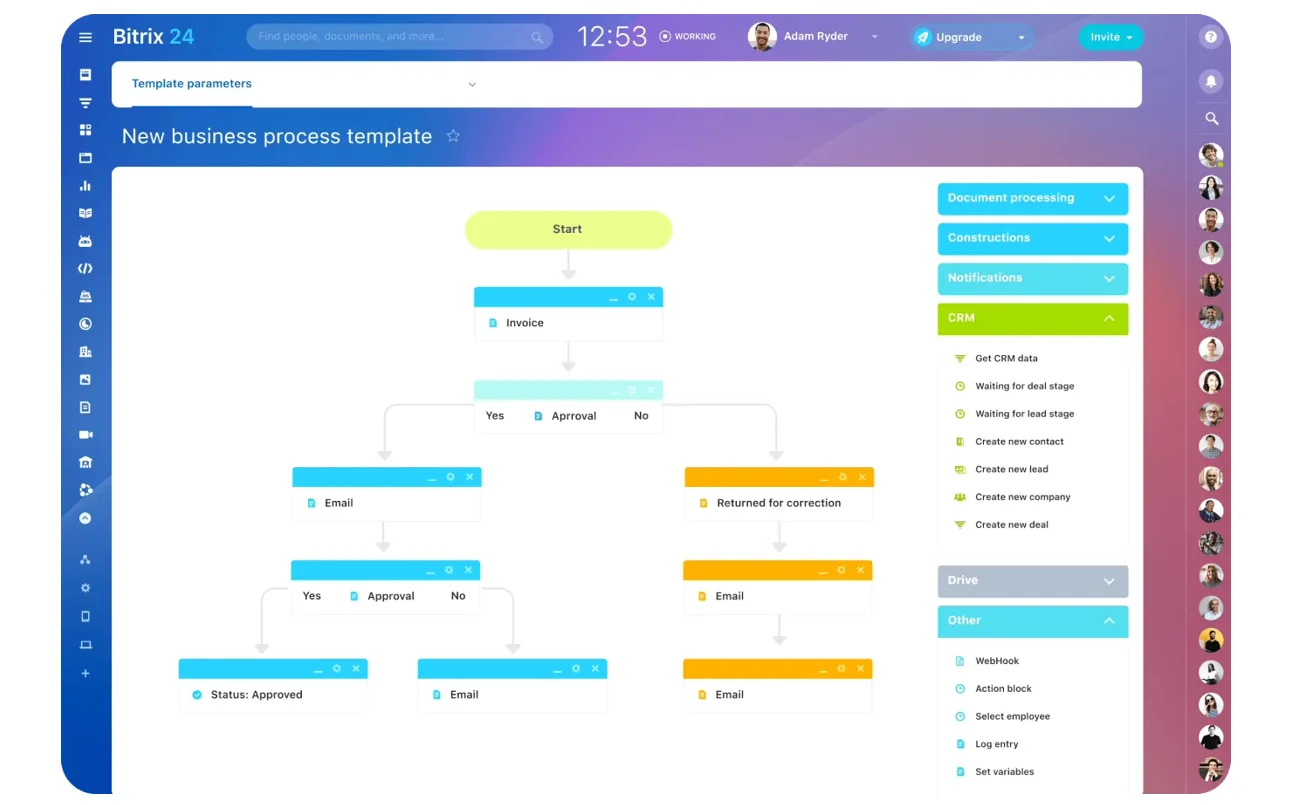
You revisit a heavier platform if the baseline maxes out. But the lesson holds: start with the thing that solves most of the problem cleanly, not all of it with friction.
Step 5: Set budget tiers, owners, and a 60-day proof window
Once you know what needs fixing, put tool spend into tiers. This keeps your roadmap from turning into a pile of urgent exceptions.
A simple structure works:
Must-fix now: breakdowns causing active revenue loss, delayed activation, or billing risk
Test now: meaningful issues that justify a lightweight pilot
Later-stage: useful upgrades that matter more once volume, headcount, or process maturity increases
This gives you a practical way to say no without losing the idea. It also helps founders protect budget for operational risk instead of spending reactively.
For every approved tool, assign one accountable owner. Not three. Not "Ops and sales together." One person should own implementation, usage rules, field definitions, and metric review. Shared interest is fine. Shared accountability usually means nobody closes the loop.
Then set a 60-day proof window. That's long enough to get setup done, train users, and see whether the workflow improves. It's short enough to stop subscriptions from drifting for six months without a decision.
Measuring success
Pick success metrics tied to the handoff itself, such as:
- Lead response time reduced from 8 hours to under 1 hour
- Closed-won to kickoff time reduced from 10 days to 4 days
- Missed approval requests reduced by 80%
- Manual status updates per project cut in half
Reserve budget beyond license cost too. Most startups underestimate setup, admin cleanup, template work, and training. A useful rule is to set aside implementation budget equal to at least 20% to 50% of first-year software cost for any tool that touches multiple teams.
The big picture
Tier the spend, name one owner, and demand a 60-day proof tied to handoff metrics. If the transition doesn't improve, the tool hasn't earned its place.
Step 6: Review common mistakes, build for reliability, and answer practical questions
The most common mistake is using software to avoid process discipline. If no one agrees on when a lead is qualified, what counts as handoff-ready, or who approves a discount, a new tool will just formalize confusion.
Get the decision rules clear first, then automate them.
As Amit Kothari, CEO of Tallyfly, put it, "Process comes before technology. Most automation failures are process failures with software bolted on top. Fix the process first."
Other frequent slip-ups
- Overbuying seats before usage patterns are clear
- Skipping integrations and relying on copy-paste between systems
- Funding convenience tools that save a little time but don't stabilize a real breakdown
- Letting every team create its own naming, stages, and fields
Build for scale and consistency
As volume grows, reliability matters more than feature breadth. Standardize naming conventions, permission levels, alerts, core field definitions, and short operating notes for each critical workflow. You don't need a giant process manual. You do need enough consistency that a new hire can follow the system and produce the same result.
Quarterly tool reviews help too. Look for duplicate tools, abandoned workflows, broken integrations, and metrics that no longer justify the spend. Growth creates tool sprawl quietly.
Fix startup handoffs without tool sprawl
Bitrix24 unites CRM, projects, approvals, and team communication so leads, onboarding, and billing move without costly gaps.
Get Started NowThe bottom line
If you remember one thing, make it this: the best startup tool budget isn't the one with the most software. It's the one that makes your most fragile handoffs boring, visible, and dependable. Even teams that have bought the tools feel this — 73% of sales and ops leaders say record creation still takes too long, which means the software isn't where the problem lives. The handoff is.
Spend where the work gets lost, not where the demos look best.
FAQ’s
When should we replace spreadsheets?
Replace them when a sheet becomes a live handoff system and failures are happening because updates are late, hidden, or inconsistent. If the sheet is just analysis, it may be fine longer. The moment you see people spending an hour manually copying data from one spreadsheet to another, that's your signal to move.
How much budget should we reserve for implementation?
For lightweight single-team tools, keep a small admin buffer. For cross-functional tools, reserve meaningful setup time or outside help. The hidden cost is usually in cleanup, workflow design, and adoption. Many teams find that 30–40% of their actual value comes in month three, after they've gotten past the initial setup.
Point tools or suites?
Point tools work best when one handoff is clearly broken and the rest of your stack is workable. Suites make more sense when multiple workflows share the same data model and you have capacity to standardize around them.
A unified CRM, project management, and communication layer like Bitrix24 often beats a collection of single-purpose tools for early-stage teams. Why? Fewer integrations to maintain and clearer data flow.
How should we budget for part-time users?
Don't default to full paid seats for occasional participants. Map who actually creates, edits, approves, and only-views. Many startups can cut waste here without losing access.
What if the founder is the main handoff bottleneck?
That's common and often overlooked. The first budget priority isn't more functionality, it's workflow visibility and decision routing. Build a system that makes founder decisions explicit, trackable, and easier to delegate over time. Your infrastructure needs to support delegation, not just efficiency.