Before Buying Project Software, Watch How Work Actually Gets Stuck


Short answer: the best project software is the one that fixes where work actually slows down.
That’s the mistake many teams make when choosing project management software. They compare dashboards, templates, automations, integrations, and interface preferences before they’ve checked how work really moves through the business.
The result is predictable: the company buys a tool that neatly organizes visible tasks, while the real delays remain untouched.
If approvals sit in inboxes, priorities change halfway through delivery, or teams discover dependencies too late, more features won’t solve the problem. The buying team needs to identify the workflow constraint first.
Atlassian’s 2025 State of Teams report found that leaders and teams waste 25% of their time searching for answers. That kind of delay rarely appears on a feature checklist. It shows up as scattered decisions, unclear ownership, and work happening outside the system.
Before comparing vendors, you need to see where that friction enters the workflow. Once you can identify the wait, handoff, or decision causing the delay, you can turn it into a buying criterion and avoid paying for features that leave the real problem untouched.
What it means to observe work before buying project software
Observing work means studying the real path of requests, tasks, approvals, and decisions as they move across teams.
You’re looking for things like:
- Where work waits
- Who touches it
- When priorities shift
- Which exceptions cause rework
- How people keep things moving when the official process isn’t enough
That’s different from asking stakeholders what features they want. Feature requests are usually filtered through personal habits, recent frustrations, and whatever problem feels loudest that week. Observation focuses instead on the points where work waits, loops, or requires someone to intervene.

What this looks like in practice
A team might say it needs better dashboards. Observation may show that the real issue is poor intake quality upstream, so projects start with missing briefs, vague owners, or no approval path.
Another group may ask for more automation. In practice, the bigger problem may be that no one knows who can approve changes, so work sits untouched until someone escalates in chat.
Questions that expose the real bottleneck
Watching the work doesn’t require months of formal process mapping. It usually starts with a few grounded questions:
- How does a request enter the system?
- Where does it wait longest?
- What triggers rework?
- What happens outside the tool?
- Which updates are trusted, and which are cosmetic?
- Who has to chase people to keep work moving?
A sales team tracking deal-related tasks manually will often discover that task creation isn’t the issue. The harder part is the handoff from sales to onboarding after a deal closes.
A marketing team may find that campaign delays come from late approvals rather than weak planning.
An operations team may discover that work stalls because requests arrive through email, chat, forms, and spreadsheets with no common intake standard.
In Bitrix24, this kind of observation can translate into a more practical setup: requests can enter through structured tasks, teams can coordinate using its task and project management tools, and recurring instructions can live in a knowledge base.
The value comes from matching the setup to the bottleneck, instead of turning on every feature.
Pro Tip
Before you evaluate vendors, run a “work delay audit” on three recent projects. For each one, note the longest wait, the reason for rework, the person who had to chase updates, and the decision that arrived late. Those four signals will usually tell you more than a feature checklist.
Why workflow observation matters more than feature depth
Project software creates business value when it reduces coordination costs, shortens cycle time, improves visibility into real work, or standardizes decisions that used to depend on chasing people down.
Extra capability by itself isn’t value. It becomes value only if it changes execution.
That’s where many evaluations drift off course. Buyers often overrate configurability, custom fields, automation menus, or template libraries because those things are easy to see in a demo.
They underrate whether the tool fits real approval paths, cross-functional dependencies, exception handling, and communication patterns. Those are the mechanisms that determine whether work moves or stalls.
Feature match vs. flow fit
A useful distinction is feature match versus flow fit.
Feature match asks, “Does the software have the functions we listed?”
That may include boards, Gantt charts, dashboards, workload views, automations, forms, permissions, integrations, and reporting.
Flow fit asks, “Will this software improve the actual way work moves through our organization?”
That means checking whether the tool supports the messy parts of work: late feedback, unclear owners, changing scope, dependent teams, approval queues, and exceptions.
A platform can score high on feature match and still fail on flow fit.
What failure looks like after launch
That failure tends to show up after launch. Teams enter tasks, build boards, and comply just enough to satisfy reporting requirements.
Meanwhile, the real coordination still happens in email threads, side meetings, spreadsheets, and direct messages because the software isn’t aligned with how decisions and dependencies actually work.
Asana’s 2024 State of Work Innovation report found that workers say they spend 53% of their time on busywork. That figure matters because “busywork” often includes the exact coordination tasks that weak workflows create: chasing updates, searching for context, sitting in unnecessary meetings, and duplicating information across tools.
Feature depth still matters. It should come after the buying team knows what kind of friction the business is trying to remove.
Without that, “more capability” often means higher cost and more setup. Not to mention more admin for teams that are already stretched...
Bottleneck Detective Worksheet: Map Delays in 30 Minutes
Enter your email address to get a comprehensive, step-by-step guide

How work actually gets stuck inside organizations
Most operational slowdowns come from a fairly small set of mechanisms:
- Ownership is unclear
- Reviewers are overloaded
- Intake is inconsistent
- Priorities keep shifting
- Dependencies are hidden until late
- Communication is split across systems
- Approval loops are undocumented
The problem is that many of these blockers aren’t visible on the task board. A board can show lots of activity and still hide the real reason delivery is slipping.
The status says “in review.” A more accurate reading may be “waiting in someone’s inbox.”
On Tuesday afternoon, the project manager opens the board and sees six items marked “in review.” By Thursday, none have moved. The reviewer hasn’t rejected them; the links are buried in an email thread, and nobody agreed which item should be checked first. The board is technically accurate, but it doesn’t show the decision that’s holding everything up.
A card marked “blocked” can hide a different problem: another team was never aligned on the timing in the first place.
Why task boards can hide the real constraint
Software can appear underused when key workflow events happen outside the system.
Work gets advanced in meetings, redefined in chat, clarified in documents, and delayed in spreadsheet-based intake queues. The platform records motion. It doesn’t always capture the constraint.
|
Surface symptom |
Root workflow constraint |
|---|---|
|
Late delivery |
Handoff delay between teams or overloaded approvers |
|
Missed deadlines |
Shifting priorities and hidden dependencies |
|
Status confusion |
Updates happening outside the system and unclear ownership |
|
Frequent rework |
Incomplete intake, late feedback, or changing scope |
|
Too many “urgent” projects |
No intake discipline or weak prioritization rules |
|
Heavy project manager effort |
Manual coordination compensating for poor workflow design |
Once you look through that lens, the conversation changes. The useful question becomes: “Which constraint is creating the delay, and can software realistically make that constraint visible, manageable, or smaller?”
For example, if a customer support improvement project keeps slipping because product, legal, and operations all need to review changes, the buying team should care less about board design and more about approvals, comments, task dependencies, and shared documentation.
Bitrix24’s task management tools, workgroups, calendars, and communication tools can help here when they’re configured around the real handoff points.
Pro Tip
Don’t ask teams, “Where do projects get delayed?” Ask, “Where do you check for the latest version of the truth?” If people name three different places, the workflow problem is already visible.
The core signals to evaluate before any software purchase
Before buying anything, look for a few specific signals.
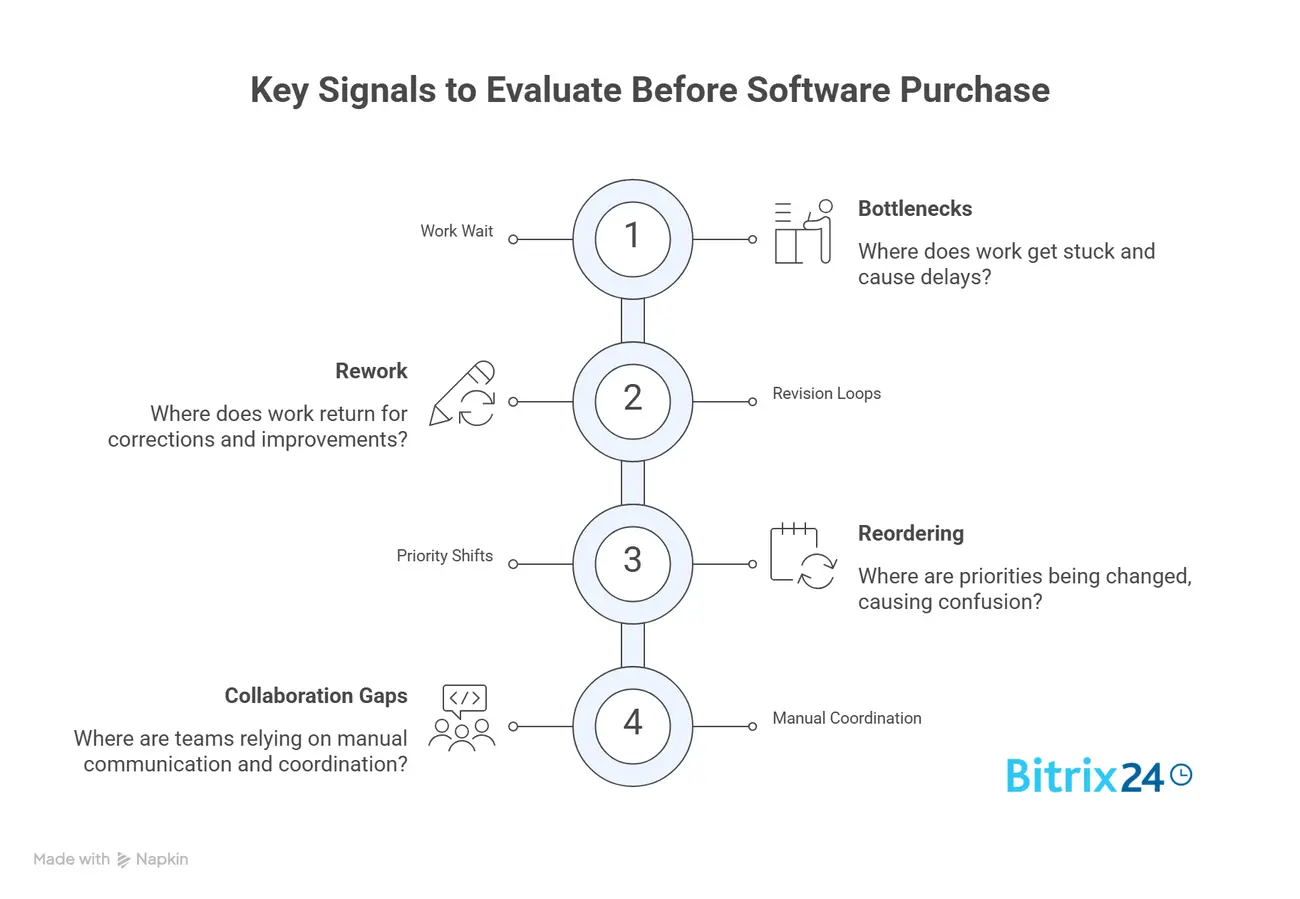
1. Where does work wait?
Look for the point where work stops moving. Waiting time often reveals more than task volume.
A project may have plenty of updates, comments, and status changes while still being stalled by one unresolved approval or missing decision.
2. Where does work come back for revision?
Rework is a strong signal that information is arriving incomplete, approvals are happening too late, or decision criteria are inconsistent.
A tool can help here, but only if the buying team knows what is causing the loop.
3. Where are priorities being reset?
Constant reprioritization usually points to weak intake controls, poor portfolio visibility, or ambiguous authority.
If every request becomes urgent, the software won’t fix the deeper problem. The team needs clearer rules for what gets accepted, delayed, escalated, or rejected.
4. Where are teams relying on manual coordination?
If delivery depends on project managers chasing updates across five channels, that’s a workflow signal rather than a reporting inconvenience.
Manual coordination is often the workaround people create when the formal process doesn’t reflect how decisions actually happen.
Operating components to assess
Look at these before comparing vendors:
- Intake quality: Are requests complete enough to start work without back-and-forth?
- Ownership clarity: Is it obvious who decides, who executes, and who reviews?
- Dependency visibility: Can teams see what they’re waiting on and who is affected?
- Approval design: Are approvals structured, timely, and limited to the right people?
- Capacity constraints: Are delays caused by load, rather than planning tools?
- Reporting trustworthiness: Do people believe the system reflects reality?
- Exception handling: What happens when work doesn’t follow the standard path?
This is the practical shift: treat software as a response to a specific workflow mechanism that can be standardized, automated, surfaced, or simplified.
In Bitrix24, that may mean using task templates for recurring work, calendars for deadline visibility, task automation for routine handoffs, and CRM-linked tasks when customer-facing work needs to move from sales into delivery.
The setup should follow the workflow signal.

Common mistakes companies make when selecting project software
Mistake 1: Buying for executive visibility alone
Leadership wants cleaner reporting, consolidated status views, and fewer surprise delays. That’s reasonable. But if the platform mainly improves dashboards while teams still deal with the same approval bottlenecks and coordination chaos, execution won’t improve much.
The company gets better optics, while delivery stays slow.
Mistake 2: Assuming poor delivery always means poor tooling
Sometimes delivery problems come from a lack of tools. Often, they come from weak governance, unstable prioritization, or unclear decision rights.
Software can expose those issues, but it can’t create discipline where none exists.
Mistake 3: Confusing user preference with operational need
A tool may feel intuitive in a demo because one department can imagine using it for its own work.
That doesn’t mean it will hold up when legal, finance, operations, product, sales, and external partners all intersect around shared timelines and dependencies.
Cross-functional complexity is where many attractive tools start to fray.
Mistake 4: Treating adoption problems as training problems
Sometimes people resist a system because they don’t understand it.
Sometimes they resist because it adds administrative work without helping them move work faster. That’s a design mismatch.
One team rolls out a new platform and schedules two training sessions. A month later, people still update the board on Friday afternoon, after the real decisions have already happened in chat and meetings. Management calls it an adoption problem. The team sees it as duplicate entry.
Where selection usually goes wrong
- The buying team scores features before studying workflow friction.
- Executives ask for dashboards before teams agree on status definitions.
- Departments optimize for their own work and ignore cross-team handoffs.
- Automation is added before the underlying process is stable.
- Rollout focuses on training sessions instead of changing day-to-day behavior.
- Project managers become the workaround for poor workflow design.
Pro Tip
If a proposed workflow depends on one project manager remembering to chase every update, it’s not ready for automation. Define the trigger, owner, deadline, and escalation path first.
Real-world business use cases where observation changes the buying decision
Observation changes the buying decision because it changes the problem being solved.
Marketing operations
In marketing operations, a team might think it needs stronger campaign planning software because launches keep slipping.
After observing the workflow, it may become clear that task tracking isn’t the limiting factor. The real delays come from legal review, brand approvals, and assets arriving late from other teams.
In that case, the better buying criterion is whether the software can support structured intake, timed approval stages, comments in context, and visibility into queue health.
A practical setup might include campaign request forms, task templates for launch stages, assigned reviewers, and shared calendars. Bitrix24’s marketing tools and task tools can support this when campaign work needs both planning and coordination across teams.
Product and engineering
In product and engineering, companies often focus on roadmap views, sprint templates, and backlog management.
Those features can help, but observation may show that the larger issue is dependency management across teams.
A product launch may be delayed because infrastructure, data, security, and QA dependencies are discovered too late. That changes the buying decision toward tools that handle cross-team coordination well, rather than tools that only manage team-level planning.
Here, the evaluation should include dependency visibility, shared milestones, ownership rules, and escalation paths. A clean backlog won’t help much if the team learns two weeks before launch that another department owns a critical dependency.
Client delivery and professional services
In client delivery or professional services, leadership may assume better project plans will solve margin pressure or timeline drift.
Watching the work often shows something else: requests come in with inconsistent scope, clients change priorities midstream, and resources are allocated based on partial information.
In that environment, intake consistency, change control visibility, and resource contention matter more than generic Gantt features.
A professional services team may need client-facing milestones, internal task dependencies, document storage, and approval history. If the project platform can’t support those handoffs, managers will rebuild the workflow in spreadsheets and email.
Sales-to-delivery handoffs
Sales-to-delivery work is another common failure point.
The sales team may close a deal with customer expectations stored in call notes, email threads, and CRM fields. Delivery then starts with partial context and has to re-ask questions the customer already answered.
The kickoff meeting starts on Monday. Delivery asks for the agreed reporting requirements, the account manager searches through call notes, and the customer has to repeat a conversation they thought was settled. A week disappears before the first task is ready to start.
That’s a workflow problem, rather than a project planning problem.
In Bitrix24, a team could use CRM records, tasks, and workgroups so customer information, internal assignments, and onboarding steps stay connected. The goal is simple: reduce the gap between “deal closed” and “work ready to start.”
These examples all point to the same pattern. The software category may be the same, but the buying logic changes once the workflow constraint is visible.

Operational impact, scaling considerations, and the limits of software
When companies buy based on actual workflow constraints, adoption tends to improve for a simple reason: users can see the system helping with real friction.
It becomes a tool that makes approvals clearer, dependencies more visible, intake more consistent, or queue pressure easier to manage.
That feels different in day-to-day work.
What improves when the workflow is clear
Over time, the operational gains can be substantial. The right platform can help teams:
- Standardize how requests enter the business
- Expose where work is piling up
- Improve forecasting
- Reduce manual follow-up
- Create cleaner handoffs between departments
- Make reporting more trustworthy
At scale, those benefits matter because coordination drag compounds quickly as teams, stakeholders, and exceptions increase.
Where software reaches its limit
Scaling only works if the operating model is defined well enough to support the software.
If there’s no shared understanding of ownership, approval logic, or prioritization rules, the platform often becomes a digital layer on top of confusion. It might centralize the mess, but it won’t resolve it.
And there are clear limits. Software can’t fix:
- Unclear strategy
- Chronic under-resourcing
- Weak management discipline
- Avoided decisions
- Conflicting executive priorities
- Constant scope changes with no trade-offs
Those constraints need operating changes, not just better tooling.
A useful rule of thumb: software is strongest when the workflow problem is visibility, consistency, coordination, or standardization. It is much weaker when the problem is leadership, staffing, or strategy.
FAQ: What buyers usually ask before committing
Should we replace software if the issue is process-related?
Not automatically. If the current platform can support the workflow changes you need, replacing it may add disruption without solving the real problem.
But if the tool actively prevents clear handoffs, visibility, or structured approvals, then process fixes alone may not be enough.
How do we evaluate tools when each department works differently?
Don’t force identical workflows everywhere. Instead, look for common control points:
The tool should support variation in team execution while still making shared workflow risks visible across the organization.
What if bottlenecks sit outside the project platform?
That’s common. If approvals happen in email or decisions happen in meetings, the buying question becomes whether the software can bring those events into a clearer operating flow or at least expose where they’re causing delay.
A platform doesn’t need to contain every action, but it shouldn’t hide the critical ones.
Are spreadsheets, email, and chat always a problem?
No. In smaller or lower-complexity environments, they can work fine.
They become a warning sign when teams can no longer trust what’s current, when updates are scattered across channels, or when managers spend too much time reconciling different versions of reality.
What if executives want dashboards now?
Dashboards are useful, but they should reflect an operating system that captures real workflow events.
Otherwise, leadership gets polished reporting on top of weak execution data.
Where does Bitrix24 fit into this decision?
Bitrix24 makes the most sense when the workflow problem crosses tools or departments: tasks in one place, approvals somewhere else, customer context in the CRM, and decisions scattered across chat or meetings.
Used well, it can connect communication tools, task management, CRM, calendars, and workgroups into one operating flow. The key is to configure it around the actual delays, instead of a generic feature list.
Fix workflow bottlenecks before they grow
Bitrix24 connects tasks, CRM, approvals, chat, and calendars so teams can see delays, clarify ownership, and move work faster.
Get Started NowChoose the bottleneck before you choose the tool
Don’t start your next software evaluation with a demo. Start with three delayed projects. Find the approval, handoff, or decision that cost the most time, then judge each platform by one question: will it make that failure less likely next time?
When the constraint crosses tasks, CRM records, calendars, approvals, and team communication, Bitrix24 gives you one place to redesign the flow around it.
Sign up for Bitrix24 for free and fix the handoff that keeps slowing your team down.