The First 30 Days: Automating the User Journey to Reduce SaaS Churn

TL;DR: Most SaaS churn happens because users don't reach value fast enough, not because the product is bad. Automate the first 30 days with a four-phase journey (activation → adoption → expansion → retention), track onboarding health scores, and trigger interventions when users stall. Six core automations prevent most early churn.
Most SaaS churn isn’t a product problem. It’s an onboarding and experience problem.
Salesforce found that 88% of customers say the experience a company provides is as important as its products or services. McKinsey has shown that when companies remove friction and redesign key customer journeys, churn can drop materially because customers reach value faster and get stuck less often.
That’s the job of the first 30 days in SaaS: get users to a first win quickly, turn that win into repeat usage, and prevent stalls before they become cancellations.
Automated user onboarding is a system of CRM workflows, health scoring, and triggered communications that guide new users through setup, first value, and habit formation, intervening automatically when behavior signals churn risk.
Instead of hoping users figure it out, you build a repeatable path from signup to retention.
This guide is for SaaS customer success teams, product-led growth operators, and founders experiencing high first-month churn despite strong acquisition. You'll learn how to map the 30-day journey, build a simple health score, and implement six automations that prevent most early churn.

Key Terms Defined
Time-to-value (TTV): How long it takes a new user to reach their first meaningful outcome—the moment the product proves its worth.
Activation: The point where a user completes setup and achieves their first win, making continued usage likely.
Onboarding health score: A points-based measure combining positive signals (setup complete, repeat usage) and risk signals (inactivity, stalled progress) to predict retention or churn.
Churn risk trigger: A behavioral signal (no login, incomplete setup, usage drop-off) that automatically initiates follow-up or escalation.
Why Users Churn Early
Early churn comes down to one thing: users don't reach value fast enough to justify changing their routine.
|
Churn Pattern |
What Happens |
Why It Kills Retention |
|---|---|---|
|
Setup stalls |
Key configuration incomplete |
Product can't deliver value |
|
No first win |
User never sees a tangible result |
Motivation disappears |
|
Too many options |
Next step unclear |
Hesitation → abandonment |
|
No habit formed |
One login, then silence |
Product never enters workflow |
|
Single-user adoption |
No teammates involved |
No internal dependency to protect account |
What automation solves:
- Consistency: Every account gets the same structured path
- Timing: Nudges happen when behavior shows risk, not after weekly check-ins
- Routing: At-risk accounts get human help quickly via automatic escalation
The 30-Day Journey Map
Structure the first month in four phases, each with one job: move users closer to value, habit, and long-term adoption.
|
Phase |
Days |
Goal |
Success Looks Like |
|---|---|---|---|
|
Activation |
0–7 |
Complete setup, reach first win |
User connects data, completes first workflow, sees real result |
|
Adoption |
8–14 |
Turn progress into repeat usage |
3–4 logins/week, repeats core workflow without support |
|
Expansion |
15–21 |
Shift to shared workflow |
2–3 teammates invited, work assigned inside platform |
|
Retention |
22–30 |
Lock in long-term value |
Stable weekly usage, exploring advanced features |
The 5 milestones that predict retention:
- Setup completed
- First value achieved
- Repeat usage started (multiple days, not one session)
- Team adoption signals (invites, shared work)
- Low friction (few unresolved issues)
If users hit these milestones, churn risk drops sharply. If they miss them, churn becomes predictable. And preventable.
Pro Tip: Define first value by outcome, not feature
Activation shouldn’t mean “used a feature.” It should mean “achieved the goal they signed up for.” If you collect primary use case at signup, you can tailor milestones and triggers around that outcome, making automation feel relevant instead of generic.
30-Day SaaS Onboarding Map: Retention Risk Prevention Templates
Enter your email address to get a comprehensive, step-by-step guide

Building an Onboarding Health Score
Most early cancellations are predictable. Users show signals long before they churn. A health score answers one question: Is this account moving toward value or drifting toward churn?
Positive signals (add points):
- Setup completed: +25
- First value achieved: +25
- Repeat usage (3+ active days/week): +20
- Integration connected: +15
- Teammate invited: +15
Risk signals (subtract points):
- No login after 48 hours: −30
- Setup incomplete after Day 7: −20
- Only one user after Day 14: −15
- Support issue unresolved 48+ hours: −20
- 7 days inactivity: −40
Health bands that drive action:
|
Score |
Status |
Action |
|---|---|---|
|
80–100 |
Healthy |
Introduce next workflow, maintain momentum |
|
50–79 |
Watchlist |
Send targeted nudges, remove friction |
|
0–49 |
At risk |
Trigger intervention: personal outreach, escalation |
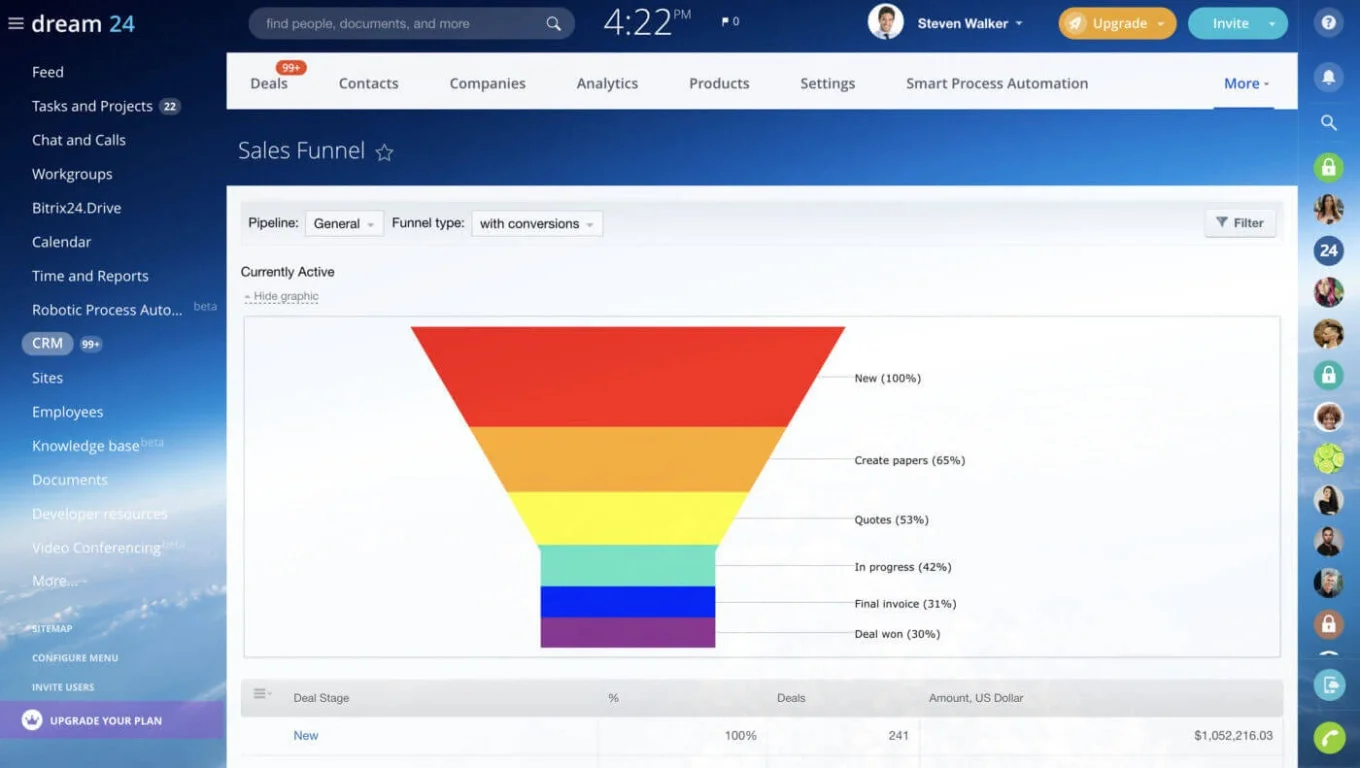
Track health scores in your CRM with custom fields that update based on user behavior and milestone completion.
Pro Tip: Track momentum, not just score
A health score shows where an account stands today, but momentum shows where it’s heading. Compare this week’s activity to last week’s — declining usage is often the earliest churn signal. Intervening at the first sign of slowdown is more effective than waiting for a score to drop into “At risk.”
The 6 Automations You Need
You don't need 20 workflows. You need six automations that push users toward milestones and trigger intervention when momentum breaks.
1) Welcome + Setup CTA (Day 0)
Trigger: Account created
Action: Send welcome message with one clear CTA: "Complete setup"
Why it matters: Unclear Day 0 kills momentum before it starts
2) No Activity Rescue (48 hours)
Trigger: No login or key action within 48 hours
Action: Send "start here" nudge; create follow-up task if still inactive
Why it matters: Most silent churn starts here—before setup begins
3) Setup Stalled Rescue (Day 5–7)
Trigger: Onboarding checklist under 50% by Day 5–7
Action: Message naming exact next step; escalate to CS if stalled by Day 10
Why it matters: Incomplete setup blocks value delivery
4) First Win → Next Step (Habit Builder)
Trigger: First value milestone completed
Action: "Nice work — here's what to do next" with goal: "Do this twice this week"
Why it matters: First win creates belief; repeat wins create habit
5) Drop-off Detection (5–7 days inactivity)
Trigger: No activity for 5–7 days during first month
Action: Check-in offering help; CS task if no response; move to At Risk
Why it matters: Long early gaps predict churn unless you intervene fast
6) Team Rollout Push (Day 14–21)
Trigger: No teammates invited by Day 14
Action: "Invite your team" message with rollout checklist; CS offers support
Why it matters: Multi-user adoption creates internal dependency—strongest retention driver
Use task automation to trigger these workflows based on CRM field changes and activity data.
Pro Tip: Escalate by revenue impact
Not every stalled account requires the same level of response. Combine churn risk with plan value or expansion potential to prioritize outreach. This ensures your CS time is spent where retention impact is highest — not just where inactivity is loudest.

Implementation Setup
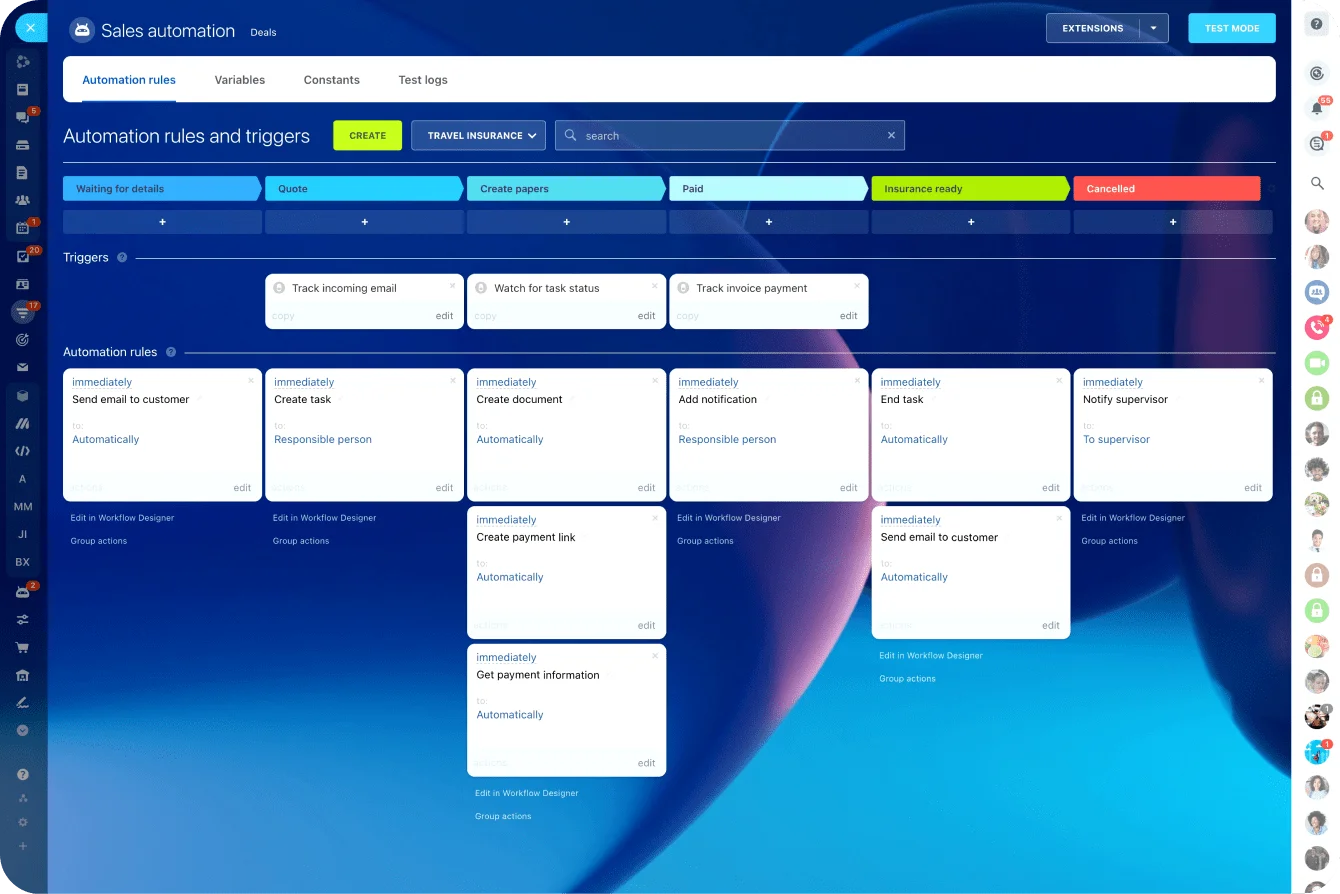
Run onboarding as a dedicated CRM pipeline so every account has a visible stage and automations trigger consistently.
Pipeline stages:
- Signed up
- Setup in progress
- Setup completed
- First value achieved
- Team activated
- Watchlist
- At risk
- Retained/active
Essential fields to track:
- Primary use case
- Plan type
- Team size
- Onboarding owner (CSM)
- Last activity date
- Health score band
- Teammates invited (Yes/No)
Connect stage changes to automated workflows, so follow-up happens without manual intervention.
Message Templates
Welcome (Day 0):
Subject: Quick start: your next step
Hi [First name], welcome to [Product]. Your fastest path to value: complete setup first. Start here: [setup link]. If you get stuck, reply and we'll help you unblock it.
Setup stalled (Day 5–7):
Subject: Want help finishing setup?
Hi [First name] — quick check-in. Setup isn't complete yet, which makes it harder to see results. Your next step: [specific step]. Reply "help" and we'll finish this in 10 minutes.
Drop-off check-in (5–7 days inactivity):
Subject: Still working on [goal]?
Hi [First name] — just checking in. Best next step: [one action]. If something blocked you, tell me and we'll fix it quickly.
Store templates in your knowledge base so your team uses consistent messaging.
When This Approach Doesn't Apply
Automated onboarding delivers ROI when you have volume and a repeatable product experience. It's less useful when:
Your product requires heavy customization. If every customer needs a unique setup, automation creates friction rather than reducing it. Focus on high-touch onboarding instead.
You have very few new customers. With under 10–20 new accounts monthly, manual onboarding may be more effective than building sales automation infrastructure.
Time-to-value is inherently long. Enterprise products with 90+ day implementations need different approaches than 30-day consumer-grade onboarding.
You don't know what "first value" looks like. If you can't define the activation milestone, you can't automate toward it. Map the journey manually first.
Make Retention Satisfyingly Automatic
Don't wait until renewal to fight churn. The first 30 days determine whether your product becomes part of the user's workflow or quietly fades out.
What works is a simple system you can run every week:
- Define milestones that matter
- Track onboarding health consistently
- Trigger follow-up when users stall
- Involve CS at the right moment
Bitrix24 makes this easier to operationalize because your pipeline stages, health score fields, automated tasks, and triggered messages can live in one place, so nothing depends on someone remembering to “check churn risk.”
If you want to make retention feel more predictable, start by automating the first 30 days in Bitrix24. Start for free today.
Cut SaaS Churn Within 30 Days
Automate your user retention with Bitrix24. Map out a 30-day journey, develop a health score and implement six key automations for early churn prevention.
Start NowOnboarding Automation FAQ
What is an onboarding email sequence?
An onboarding email sequence is a series of automated messages triggered by signup and user behavior, designed to guide new users through setup and first value. Typically 5–8 emails over 14–30 days, the sequence includes welcome/setup prompts, milestone celebrations, re-engagement nudges for inactive users, and next-step recommendations. Effective sequences are behavior-based (triggered by actions or inaction), not just time-based.
How can I track product usage inside my CRM?
Connect your product's activity data to CRM contact or deal records via integration or API. Track key events: logins, feature usage, workflow completions, and last activity date. Store these as custom fields that update automatically. This lets you segment users by engagement level, trigger automations based on behavior, and give CS teams visibility into account health without switching tools.
How do I identify upsell opportunities automatically?
Create automation rules that flag accounts showing expansion signals: high usage volume, multiple active users, feature limit approaches, or usage of advanced features. When these triggers fire, create a task for the account owner or move the account to an "expansion opportunity" pipeline stage. Combine usage data with CRM analytics to prioritize accounts most likely to upgrade.
How many onboarding automations should I start with?
If you automate too much early, users get overwhelmed and your team loses signal. Build the minimum set that covers the biggest churn risks: no activity, stalled setup, first win, drop-off, and team adoption. Add more only after you see consistent patterns.
What is a good onboarding health score model for early-stage SaaS?
Keep it simple and milestone-based. A strong early model uses 5–7 signals: setup completion, first value, repeat usage, inactivity gaps, and team adoption. Avoid complex weighting at first. The goal is not perfect prediction; it’s early intervention when momentum breaks.
Should onboarding automation be time-based or behavior-based?
Behavior-based is almost always better. Time-based sequences assume every user moves at the same pace. Behavior-based triggers respond to what actually happened: no login, incomplete setup, first win achieved, or inactivity. The best systems use time only as a fallback, and behavior as the main driver.
How do I prevent automated onboarding from feeling robotic?
Make automation feel like guidance, not spam. Keep messages short, focused on one next step, and tied to the user’s current stage. Use escalation rules so high-risk accounts quickly get human outreach. Automation should handle consistency and timing; your team handles nuance when it matters.