Async Communication Rules for Hybrid Sales and Service Teams


A B2B sales team closes a deal on Friday. The AE writes "customer wants fast implementation" in the CRM and signs off for the weekend. Monday morning the implementation team starts planning. Three days later they discover the customer needs a phased rollout across three departments with separate data migration schedules. The sales team knew this. It came up on calls. But that context lived in Zoom recordings and private notes nobody else could find.
That's not a communication failure. Everyone talked. The problem is that nothing was documented where the next team could act on it.
This article gives hybrid sales and service teams a framework to fix that: clear defaults for where updates, blockers, customer context, and approvals belong, so work moves forward without the constant meetings and repeated conversations.
What async communication rules mean in a hybrid team
Async communication rules are shared standards for what must be documented, where it must be posted, and when a response is expected. In plain terms, they tell the team how work should move forward when everyone's not online at the same time.
Not about eliminating conversations
These rules aren't about eliminating live conversations. The goal isn't fewer conversations for the sake of it, it's fewer avoidable interruptions, fewer status meetings, and fewer moments where work stops because the next step's unclear.
That distinction matters. A lot of teams confuse async rules with general communication etiquette (tone, meeting behavior, thread usage). Operational async rules are different; they define how actual work moves between people and systems.
The four critical buckets
For hybrid sales and service teams, the most important rules usually sit in four buckets:
- Updates: where status changes go and what details they need
- Blockers: how risks or stalled work get flagged and escalated
- Customer context: what history, commitments, and risks must be documented
- Approvals: how decisions get requested, reviewed, and recorded
The payoff
Once those are defined, people spend less time asking where to put something and more time actually moving the customer work forward. Studies show that teams using async-first tools report having 25% fewer meetings per week than teams without deliberate async communication policies.

Why the process breaks in sales and service environments
Sales and service work exposes communication gaps faster than many other functions because customer work's time-sensitive, cross-functional, and full of exceptions. One missing note can affect a demo, a kickoff, a support escalation, or a renewal conversation.
The three basics that go missing
The process usually breaks when three basics are missing:
- Ownership - who's responsible for creating the handoff note
- Channel clarity - where a blocker belongs
- Response windows - when an approval should be answered
If nobody knows these answers, people either guess or wait. Neither's good.
Where handoffs fail
Handoffs are where this gets most painful:
- Sales may close a deal without documenting implementation constraints
- Onboarding may discover a promised feature that's not standard
- Support may escalate a pattern that account management never sees
- Renewal risk may be obvious in tickets but invisible in the CRM
Research on sales handoffs found that "B2B buyers cite 'having to repeat information' as their top frustration during the buying process" — a direct result of poor handoff execution between teams. Each team has part of the picture, but the system doesn't pull it together.
How tool sprawl makes it worse
Tool sprawl then amplifies the problem. A team might use Salesforce for account data, Zendesk for service work, Slack for quick decisions, email for external updates, and Jira for onboarding. None of that's inherently wrong. The problem starts when decisions are made in one tool and expected to be acted on in another without a rule for syncing the record.
Example-in-action: A customer emails support about a billing discrepancy. Support resolves it in Zendesk and moves on. Two weeks later, the account manager prepares for a renewal call, reviews the CRM, and sees no red flags. During the call, the customer brings up "that billing mess we had to sort out". This is the first time the account manager’s heard about it. The trust damage from that moment far outweighs the original billing issue.
When trust drops
Over time, trust drops. People stop believing async messages are complete. So they ask again in chat, schedule another call, or wait for verbal confirmation. That's when the supposed flexibility of hybrid work turns into delay and rework.
Async Message Templates and Response-Time SLA Toolkit
Enter your email address to get a comprehensive, step-by-step guide

Step 1: Audit your current communication flow and handoff points
Don't start by writing a giant policy. Start by looking at how work actually moves today. The point of the audit's simple: find where communication breaks cause the most operational pain, then write rules for those moments first.
Map the main workflow from lead to service delivery and ongoing account management. For each stage, note where four things currently happen: status updates, customer notes, blockers, and approvals. Include every tool people really use, not just the official stack.
A short audit can be enough. You're not documenting the entire company. You're identifying the places where unclear async behavior causes the biggest delays or mistakes.
Questions to audit
Ask your team these questions:
- Where do customer updates get posted now?
- Where do blockers show up first?
- Where's customer history stored before handoff?
- How are approvals requested and recorded?
- Which steps rely on memory or private messages?
- Where do people most often say, "I didn't see that"?
Focus on high-friction moments first
In many teams, those are:
- Lead-to-account-executive handoff
- Closed-won to onboarding transfer
- Support escalation to account team
- Renewal risk identification
- Implementation scope changes
- Discount or contract exception requests
Create a simple mapping table
A simple table helps make the gaps obvious:
|
Workflow moment |
Current tools |
Main issue |
Needs a rule first? |
|---|---|---|---|
|
Closed-won handoff |
CRM, chat, kickoff call |
Missing implementation notes |
Yes |
|
Pricing exception approval |
Email, chat |
No visible decision record |
Yes |
|
Weekly account updates |
CRM |
Inconsistent detail |
Later |
The key's restraint. Pick two or three communication points that are hurting execution now. Fix those first. If you try to rewrite everything at once, the team will ignore most of it.
Companies with strong Sales-CS alignment can achieve 36% higher customer retention and 38% higher sales win rates, which shows why getting these handoff points right matters for business outcomes.

Step 2: Assign one channel and one owner for each message type
Once you know where the friction is, set a default home for each type of message. Every message type needs one primary channel and one clear owner. That cuts down duplicate threads and stops people from hunting across tools.
One system of record per message type
This doesn't mean every tool gets used for only one thing. It means each operational message type has one system of record. People can still discuss work elsewhere, but the trusted version lives in one place.
Define your channel-owner matrix
Here's a practical example:
|
Message type |
Primary channel |
Owner |
Purpose |
|---|---|---|---|
|
Status update |
Project tool or CRM record |
Current workflow owner |
Show progress and next step |
|
Blocker alert |
Dedicated chat channel plus linked record |
Person who identifies blocker |
Surface risk fast and assign action |
|
Customer context |
CRM or account record |
Customer-facing owner |
Maintain history and commitments |
|
Approval request |
Ticket, form, or approval queue |
Requester |
Create visible decision trail |
Ownership matters just as much as channel choice. "The team" isn't an owner. Someone must be responsible for posting the update, keeping it current, and closing the loop when resolved.
Be strict about what belongs where
Be especially strict about what belongs in CRM, project tools, chat, and email:
- CRM: customer history, commitments, risks, commercial notes
- Project or ticket tool: task progress, delivery status, implementation changes
- Chat: lightweight coordination, urgent alerts, quick clarifications
- Email: external communication or formal customer-facing follow-up
If a decision happens in chat, the owner should move the final result into the system of record. That one habit prevents a lot of future confusion.
For hybrid teams managing customer work across multiple channels, tools like Bitrix24 can help by connecting CRM context, task management, and team communication in one workspace, reducing the tool sprawl that creates async communication gaps.

Step 3: Create message templates and response-time rules
Even with the right channel, async communication fails when messages are vague. A good rule set makes messages easy to scan, easy to trust, and easy to act on.
Start with simple templates
You don't need complicated forms. You need consistent structure. The reader should know exactly where to find the issue, impact, next step, and deadline without reading a wall of text.
Use templates like these:
- Status update: Current status / customer impact / next action / owner / due date
- Blocker: What's blocked / severity / customer impact / action needed / by when
- Handoff note: Customer goal / promised scope / open risks / recent decisions / next owner
- Approval request: Decision needed / reason / business impact / options / deadline
Define minimum required fields
Minimum required fields matter because they reduce back-and-forth. In most sales and service workflows, the essentials are:
- Customer impact
- Next action
- Due date or decision deadline
- Specific decision needed
Set response-time expectations
Response-time rules are the other half. Without them, people still assume every async message needs an immediate reply. That creates constant checking and low-value urgency.
Set response expectations by urgency level, team, and work-hour overlap. For example:
|
Type |
Urgency |
Expected response |
|---|---|---|
|
Routine update |
Low |
By next business day |
|
Approval request |
Medium |
Within 24 business hours |
|
Customer blocker |
High |
Within 2 business hours during overlap |
|
Critical risk |
Urgent |
Escalate to sync immediately |
This is more realistic than telling everyone to respond fast. It creates predictable service levels inside the team, which is what people actually need.
In fact, 83% of knowledge workers say async communication increases their productivity, primarily because it lets them work without constant interruption pressure.
Step 4: Build rules for customer context, approvals, and exception handling
Some parts of communication need tighter rules than general status updates. Customer context, approvals, and exceptions are three of them because they affect downstream decisions and customer trust.
Define minimum customer context
Start with customer context. Before a handoff or escalation moves forward, define the minimum history that must be documented:
- Customer's goal
- Current setup
- Commitments already made
- Open issues
- Known risks
- Recent changes
Why this matters
If you don't define this, every handoff depends on the sender's judgment. One person writes a full summary. Another drops a single line and assumes the rest's obvious. The receiving team then has to reconstruct the account from old messages.
Make approval paths explicit
Next, make approval paths explicit. Hybrid teams often get stuck when pricing exceptions, service exceptions, contract edits, or goodwill actions have no clear approval route. The work just bounces around.
Your rule should answer four things:
- What types of decisions need approval
- Who can approve each one
- Where the request must be submitted
- How the final decision gets recorded
Keep approval paths simple where possible. For example, discounts under a certain threshold may go to sales leadership, service credits to support leadership, and non-standard contract language to legal or operations. What matters is that people don't have to guess.
Create an exception rule for sync communication
Finally, create an exception rule for when async's not enough. This is important because good async systems aren't rigid. They should tell people when to switch modes.
Common triggers for sync communication include:
- Active customer risk that may cause churn or public escalation
- Compliance, legal, or security concerns
- Revenue-impacting issue with same-day deadline
- Multi-team conflict that can't be resolved through documented comments
A simple rule works well: if the issue's time-critical, high-risk, or ambiguous enough that delay creates more damage, move to live communication and document the outcome afterward.
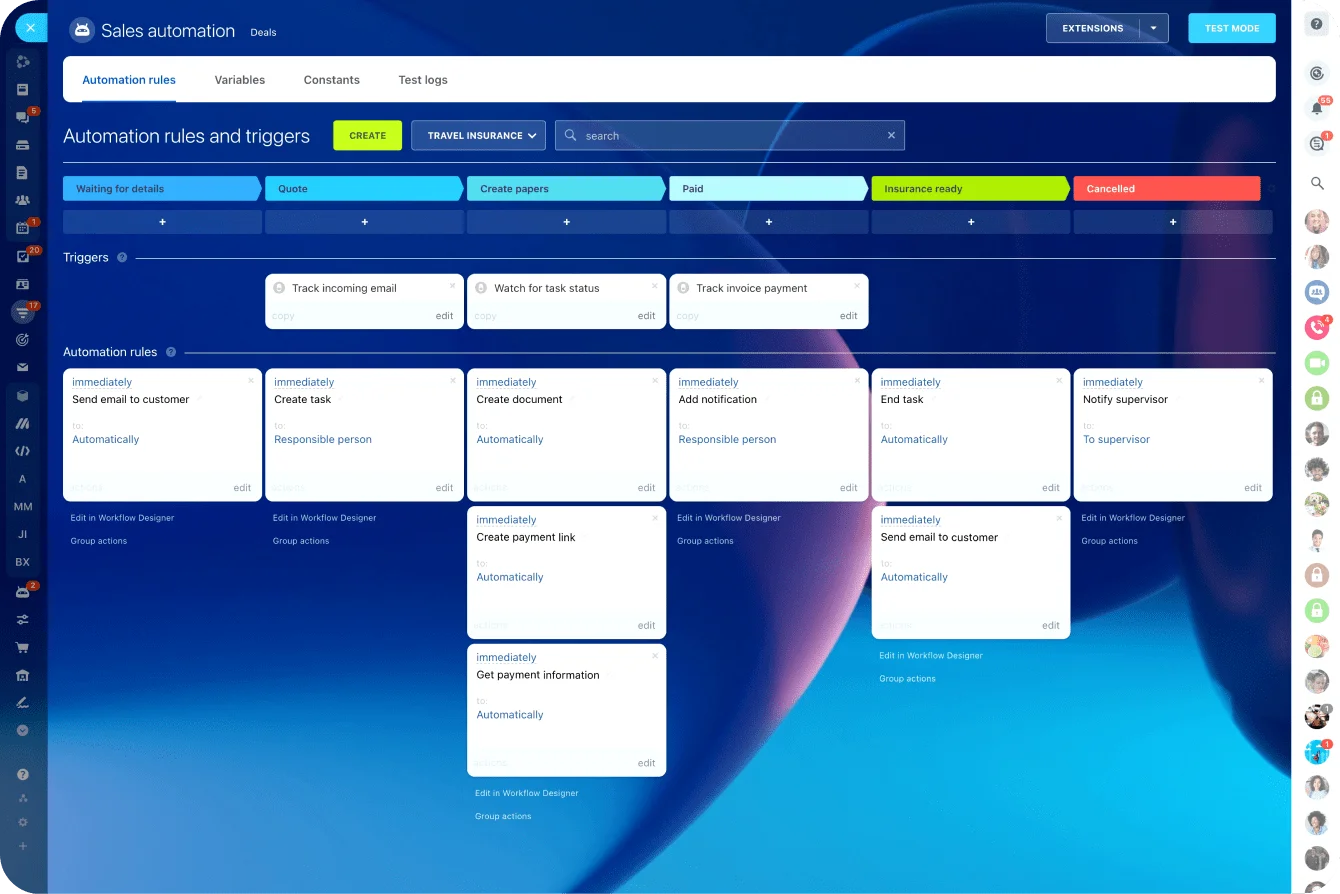
Teams managing complex approval workflows can use platforms with built-in task automation to route requests to the right approvers automatically and keep a visible audit trail.
Step 5: Roll out, reinforce, and measure reliability at scale
Don't launch the full rule set across every team and workflow at once. Pilot it in one high-friction process, fix what breaks, then expand. A closed-won handoff or approval workflow's often a good starting point because the pain's visible and the participants are easy to identify.
Run a focused pilot
During the pilot, watch for practical adoption issues. Maybe the template's too long. Maybe the owner's unclear in edge cases. Maybe the chosen tool makes updates hard to find. These aren't reasons to abandon the system; they're exactly what the pilot's supposed to surface.
Reinforce in daily operations
Once the basics work, reinforce them in normal management routines:
- Review a few real examples in team meetings
- Coach people on missing fields and weak handoff notes
- Update onboarding so new hires learn the rules early
- Build templates into the tools instead of relying on memory
Track operational metrics
To measure whether the system's reliable, track a small set of operational metrics:
- Handoff delay time
- Percentage of records missing required customer context
- Approval turnaround time
- Number of status meetings or escalation meetings
- Repeated questions caused by missing documentation
Avoid common mistakes
Common mistakes to avoid:
- Writing rules that are too broad to use in daily work
- Creating templates with too many fields
- Letting chat become the real system of record again
- Skipping response-time expectations
- Failing to assign owners for maintaining records
Scale with discipline, not perfection
As the team grows, reliability matters more than perfection. Keep the number of rules limited. Standardize only the communication points that directly affect handoffs, decisions, and customer outcomes.
Warning sign: If every message needs a process, people will go around the process.
Quick scale summary
Follow this sequence:
- Pilot one workflow - start with highest-pain handoff
- Fix adoption friction - adjust templates, clarify owners
- Embed rules in tools - templates, automations, defaults
- Track a few operational metrics - handoff time, missing context, approval delays
- Expand only after the first use case's stable - don't rush to cover everything
FAQs
How should we handle urgent after-hours issues?
Define a separate urgent path. Don't rely on normal async response rules for after-hours customer risk. Use an on-call rotation, escalation contact, or emergency channel, and document the outcome in the normal system the next business day.
What about shared inboxes?
Shared inboxes can work for intake, but they're rarely a good long-term home for customer context or approvals. Use them to receive messages, then route the actionable record into CRM, a ticket, or the defined approval workflow.
How do we manage temporary coverage when someone's out?
Coverage rules should transfer both ownership and visibility. That means not just "message this person instead," but also updating the record owner and making sure open blockers, pending approvals, and customer risks are visible in the system of record.
What if our tools are limited?
Start with the tools you have. A basic CRM field, pinned template, or shared form can go a long way. The important thing's consistency. Fancy automation helps later, but it's not required to set useful async rules.
How should multilingual teams handle notes?
Pick one default language for operational records if possible, especially for customer impact and decisions. If local language notes are necessary, require a short standardized summary in the shared team language so handoffs stay usable.
What if we're a small team without ops support?
Keep the system lightweight. Choose one workflow, one owner per message type, and short templates. In small teams, the biggest win usually comes from reducing ambiguity, not from building a complex process.
What if CRM adoption's incomplete?
Then don't pretend the CRM's your only source of truth yet. Define the best available record for each message type and gradually move more context into CRM as usage improves. Rules should reflect reality while nudging the team toward a better setup.
How do we handle external partners in the workflow?
Give internal teams a clear translation step. Partner communication may stay in email or partner portals, but internal decisions, risks, and next actions should still be logged in your chosen system of record.
Keep sales handoffs clear and actionable
Bitrix24 unites CRM, tasks, chat, and approvals so hybrid sales and service teams keep context visible and work moving.
Start NowMaking work movable without constant meetings
When the CRM record, the handoff task, the approval request, and the team chat thread all live in separate tools, even good rules break down.
Bitrix24 connects all of those in one workspace: CRM with full customer history, task management with ownership and deadlines, built-in chat, and approval workflows that create a visible audit trail. For hybrid sales and service teams, that means the rules you set in this article have somewhere reliable to live.