6 Free CRM Tools for Insurance Agents: How Does Bitrix24 Compare?


TL;DR (Quick Summary)
- Agencies outgrow a basic CRM the moment renewals start slipping and three people are guessing at the same client's history.
- The fix is matching the tool to how the agency actually works, not to the org chart you wish you had.
- Of the six compared here, Bitrix24 does the most operational heavy lifting (CRM plus tasks, calendars, and communication), while HubSpot, Freshsales, Agile CRM, and Insightly stay lighter and simpler; which one wins comes down to how much internal handoff you're managing.
Takeaway: The fix is matching the tool to how the agency actually works, not to the org chart you wish you had, since which CRM wins comes down to how much internal handoff you're managing.
Insurance runs on renewals. Miss one and the client doesn't call to complain; they just sign with someone else. The J.D. Power 2025 U.S. Small Commercial Insurance Study found only 55% of small commercial customers definitely planned to renew with their current insurer, down six points in a single year.
The gap closes with communication and service, which means it closes with process.
Most free CRMs don't support that process. They store contacts and pipeline stages. They don't run the renewal cadence, the producer-to-service handoff, or the shared client history that stops two people calling the same prospect on the same morning.
This comparison tests six free and low-cost options against that real work, so you can rule out the poor fits before you migrate a book of business into the wrong one.
What insurance teams should evaluate before switching CRM tools
Before you compare feature lists, define the process the CRM has to support. For most agencies that means lead intake, quote follow-up, policy milestones, renewal reminders, task ownership, and communication history.
Match the CRM to the team structure
A solo agent might need only:
- Contact records
- Email history
- Follow-up reminders
- A basic sales pipeline
- Mobile access
A team with producer-to-service handoffs needs more:
- Shared pipeline stages
- Role permissions
- Task ownership
- Internal notes
- Consistent client-record standards
- Visibility across departments
The common mistake is buying for the agency you hope to become, rather than the one you run today. A two-person office can burn weeks configuring workflows nobody uses. A growing agency makes the reverse error, picking something so simple that renewal handoffs still run on spreadsheets.
Define reporting questions first
Some teams just need to know:
- Which opportunities are open?
- Which follow-ups are overdue?
- Which renewals are coming up?
Others want to compare lead sources, producer activity, quote conversion, renewal status, and account-manager workload.
Write down the questions management actually asks about sales and client work. Then check whether each CRM answers them without someone exporting to Excel first.
Pro Tip
Build a short reporting test before any trial starts. Hand every vendor the same questions. A dashboard is worthless if your plan and data structure can't produce the answers your managers need.
Pressure-test the word "free"
Check:
- User limits
- Contact limits
- Storage
- Email syncing
- Automation restrictions
- Custom fields
- Reporting
- Multiple pipelines
- Recurring tasks
- Web forms
Bitrix24's Free plan covers core CRM, tasks, shared calendars, chat, and video calls, which is enough to test whether the CRM-and-task model fits how the agency works. Email integration, telephony, recurring deals, and the web form designer sit on the Basic plan. Sales automation requires Standard. If those features are central to how the agency runs leads or renewals, price the paid tier before building a migration around the free one.
Run the same check on every platform. A free CRM works when its limits match how you operate. When they don't, the missing pieces create manual work that eats the savings.
Insurance CRM Fit Scorecard: Choose Your Best Tool Fast
Enter your email address to get a comprehensive, step-by-step guide

Where free CRM tools commonly break down for insurance workflows
Free and entry-level CRMs fail insurance teams in three predictable places: account structure, communication continuity, and operational reporting.
1. Client records become overloaded
Plenty of free CRMs work fine as a contact database with a pipeline bolted on. But insurance work doesn't stop at the sale. A single client can carry:
- Several policies
- Multiple contacts
- Different renewal dates
- Open service requests
- An assigned producer
- An account manager
- Ongoing documentation requirements
Cram all of that into one contact record and a notes field, and the record gets harder to use every month.
2. Communication history becomes incomplete
When emails aren't attached to the client record, phone notes stay in someone's head, and web forms spawn disconnected records, agents rebuild account history by hand.
Say a prospect sends a quote request late Friday. A producer emails them Monday morning. Meanwhile a colleague calls, because the form created a second record with no visible owner. Both are doing useful work. The duplication comes from missing ownership and no shared history.
3. Basic reports don't answer operational questions
Basic tools show lead counts, pipeline stages, and open tasks. They stall on the questions that actually run an agency:
- Which commercial renewals are coming up?
- Which clients haven't responded to renewal requests?
- Which quotes haven't been followed up?
- Which lead sources are producing retained clients?
- Which employees have overdue client-facing tasks?
Every one of those ties the CRM straight to retention, service consistency, and workload.
A practical comparison framework for free and low-cost CRM software for insurance agents
Skip the dozens of generic feature checkboxes. Test each product against the insurance work your team performs.
|
Area |
Evaluation question |
Practical test |
|
Lead capture |
Can a website inquiry become an owned CRM record without retyping it? |
Submit a test auto-quote form and check what appears in the CRM. |
|
Client structure |
Can staff separate the client relationship from policy or opportunity records? |
Add one client with two policies and different renewal dates. |
|
Renewals |
Can the system support work 90, 60, and 30 days before expiration? |
Build one test renewal and assign each next step. |
|
Communication |
Can the next employee see what the client was told? |
Send an email, log a call, and hand the record to another user. |
|
Automation |
Can the required rule run on the plan you would actually buy? |
Test one assignment, reminder, or escalation rule. |
|
Reporting |
Can managers answer operational questions without an Excel cleanup? |
Produce a list of overdue follow-ups and upcoming renewals. |
Lead capture and ownership
Lead capture is about routing, source tracking, ownership, and fast follow-up. When a visitor requests an auto or commercial quote, the agency needs to know who owns that lead and what happens next.
A process that makes someone copy form details into the CRM, assign a producer by hand, and set a separate calendar reminder leaves a lot of room for a dropped follow-up.
Client and policy-related records
General-purpose CRMs aren't policy administration systems. So decide which insurance details belong in the CRM and which belong in an agency management system, carrier portal, or document repository.
Don't copy every policy field just because you can add custom fields. More fields mean more maintenance and more stale data.
Renewal management
Renewal support is where these tools separate. Storing a renewal date is table stakes. The stronger systems give you a workable way to run the tasks that follow from that date across a lot of accounts at once.
A repeatable process might run:
- Reviewing the account
- Requesting updated information
- Checking remarketing requirements
- Contacting the client
- Recording the outcome
- Escalating exceptions
When you compare plans, push further: can we create or trigger this work 90, 60, and 30 days before expiration on this tier, or are employees back on personal reminders?
Communication and internal coordination
Look at how calls, email, chat, notes, and internal discussion get handled. The real question: can the next person to open the account see the client-facing history and any work it created, without hunting through several systems? That matters most when one client interaction spins off tasks for someone else.
Reporting and adoption
Judge usability alongside reporting. During the trial, have producers run their normal work:
- Enter a lead
- Update a deal
- Log a note
- Create a follow-up
- Find the last client interaction
- Check what work is overdue
Employees who find routine updates a chore will stop doing them. And once the data goes in inconsistently, the reports stop being trustworthy.

The 6 free and low-cost CRM tools for insurance agents compared
Plan availability shifts constantly. Free-plan and trial status below was checked against vendor information on August 12, 2026.
|
Product |
Free access |
Best fit |
Operational strength |
Main limitation |
Workflow depth |
|---|---|---|---|---|---|
|
Bitrix24 |
Free plan |
Solo agent or very small team |
CRM plus tasks and collaboration |
Several communication and automation features require paid tiers |
High |
|
Insightly |
14-day free trial |
Solo agent to small team |
Clear pipeline and relationship tracking |
No permanent free CRM tier currently advertised |
Moderate |
|
Apptivo |
14-day free trial |
Small to growing agency |
Configurable processes and business apps |
More administration; no permanent free tier currently advertised |
High |
|
Agile CRM |
Free for 10 users and up to 1,000 contacts |
Solo agent to small team |
Basic sales and follow-up automation |
Contact and automation limits |
Moderate |
|
Freshsales |
Free for up to 3 users |
Solo agent to small team |
Pipeline and communication visibility |
More advanced functions move to paid tiers |
Moderate |
|
HubSpot CRM |
Free for up to 2 users |
Solo agent or two-person agency |
Contact history and inbound lead capture |
Free-user, contact, and automation limits |
Moderate |
Bitrix24
Best for
Agencies that need CRM plus internal task and workflow management.
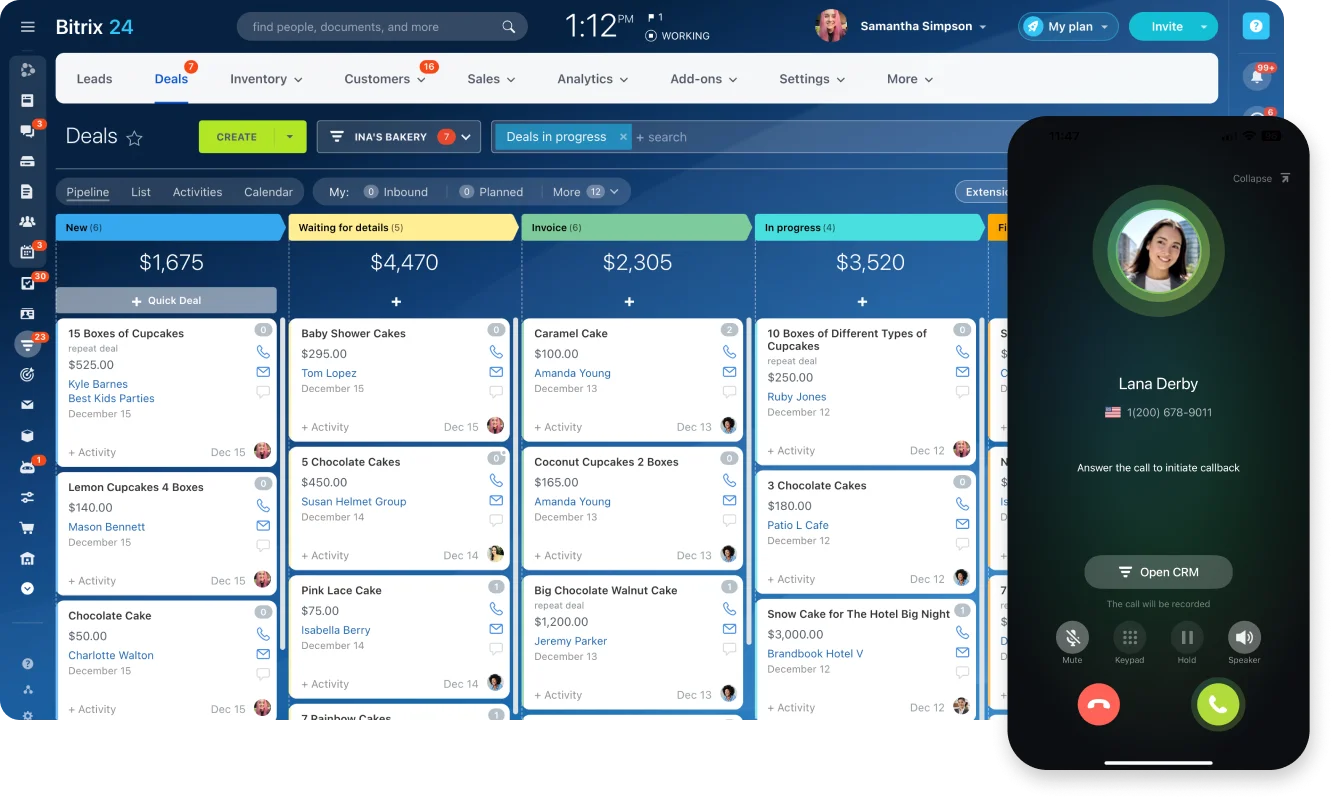
Bitrix24 combines CRM records with tasks, calendars, internal communication, and other work tools. That pays off when a client conversation creates work for someone else: a producer updates a deal or client record, and the related internal activity lives in the same place.
For renewals, an agency can build a renewal record with an expiration date, hand responsibility to an account manager, and use tasks or recurring tasks to keep the upcoming work in view.
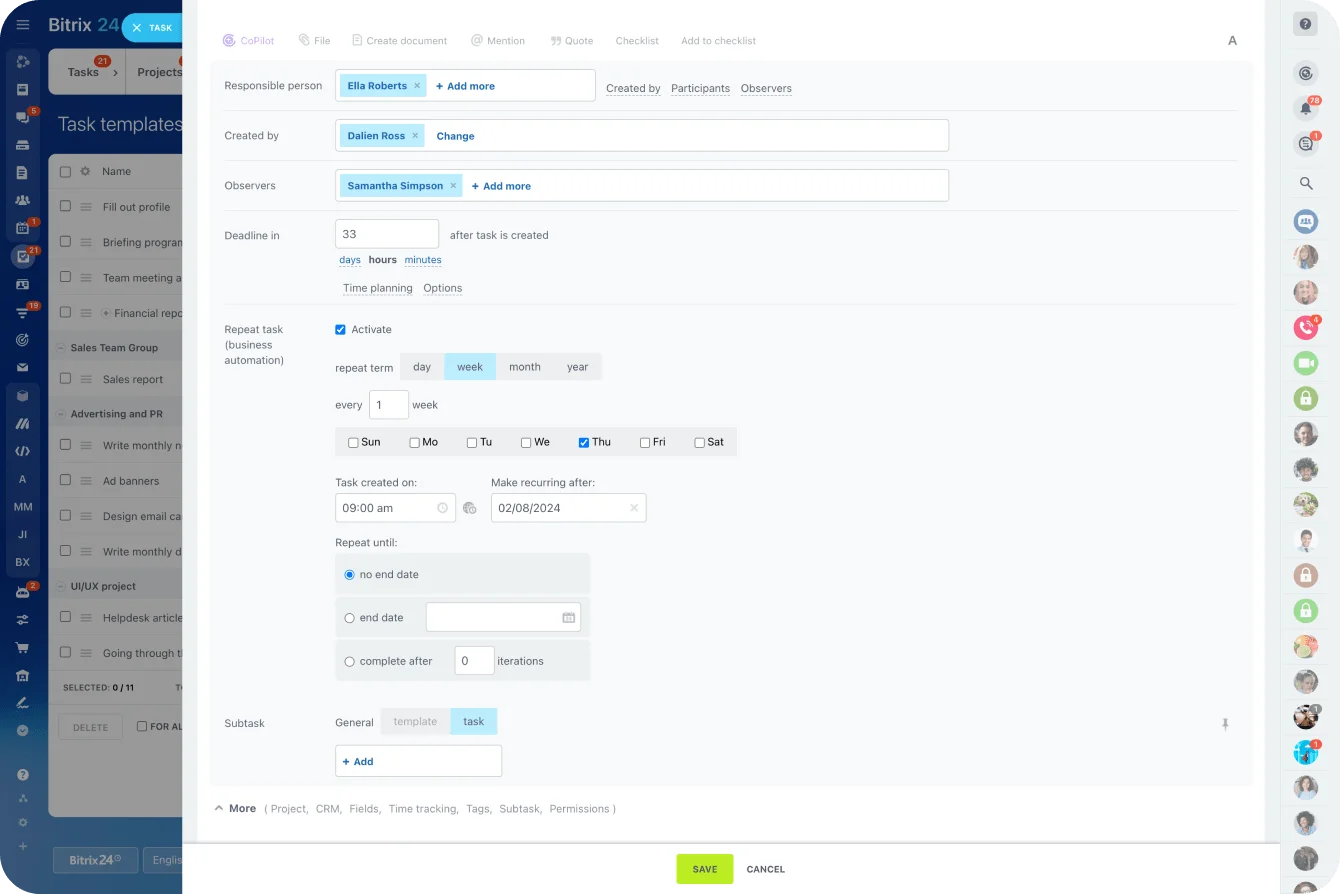
The Free plan covers more ground than most free CRMs in this category: core CRM, tasks, shared calendars, internal chat, and video calls in one workspace. For an agency testing whether the CRM-and-task model fits how it works, that's a meaningful trial. Email integration, telephony, and sales automation sit on paid tiers, so if those are central to the workflow you're evaluating, price Basic or Standard before committing to a migration.
Main limitation
It needs process decisions before a big rollout. Define how contacts, companies, deals, tasks, stages, and fields relate before you import thousands of records.
Insightly
Best for
Smaller teams that want a familiar contact-and-pipeline CRM.
Insightly keeps a straightforward structure: contacts, organizations, opportunities, tasks, and related records. Agents track referrals, opportunities, notes, and follow-up without building a whole work environment around the CRM.
Main limitation
Insightly currently advertises a 14-day trial, not a permanent free CRM plan. Its entry tier covers lead and contact management, project management, reports, and dashboards, while workflow automation sits on the higher Professional tier. So price out the paid plan you'd actually run, rather than treating the trial as your long-term cost.
Apptivo
Best for
Growing agencies that want more control over their process structure.
Apptivo is a modular business platform with CRM alongside other business apps. You can shape records and processes around your sales and servicing structure instead of forcing every activity into one standard pipeline. Its current paid tiers add configurable workflows and dashboards, which suit an agency ready to formalize how work moves between sales and servicing.
Main limitation
That flexibility is administrative work. Someone has to define fields, relationships, permissions, and process rules. And Apptivo runs on a 14-day trial followed by paid plans, so there's no permanent free tier to land on after you evaluate.
Agile CRM
Best for
Small agencies that need basic CRM and automation on a tight budget.
Agile CRM's free plan covers up to 10 users and 1,000 contacts and companies. It lists deals, tasks, email tracking, two-way email integration, telephony, a form builder, web-to-lead capture, reports, and basic marketing automation. That's enough room for a small agency to test a real lead-handling process, not just store contacts.
Main limitation
The automation allowance is thin: one campaign workflow with five nodes and one automation-rule trigger on the current Free plan. You can automate a simple first step, but a fuller acquisition or renewal sequence hits the ceiling fast.
Freshsales
Best for
Producer-led teams that care about usability and pipeline visibility.
Freshsales lets agents work with contacts, accounts, deals, tasks, appointments, notes, and activity history without configuring a heavy system first. Its Free plan currently supports up to three users and covers core contact, account, and deal management plus email tools and basic analytics. That fits teams whose daily questions stay simple: Who's the prospect? What's been said? What stage is the quote in? What's next?
Main limitation
Heavier workflows, sales automation, governance, and richer reporting push you toward paid tiers. Calling needs its own line in the budget too. Freshsales supports phone functionality, but phone credits and calling costs sit outside the $0 CRM subscription.

HubSpot CRM
Best for
Solo agents and two-person teams that want to start fast.
HubSpot CRM's current Free tools support up to two users and 1,000 contacts, with contact and deal management, email integration, forms, basic reporting, live chat, and meeting scheduling. The draw is speed: a small office builds a pipeline and starts logging activity without a long implementation.
Main limitation
The free user and contact caps are easy to understand, and they're also clear upgrade points. Automation is the other one. If you need rules that create tasks or notifications as deals move between stages, compare the paid tiers rather than assuming Free covers the workflow.
Migration and adoption considerations for insurance agencies
CRM migration is mostly an operational cleanup project. The software imports records quickly enough. The real time goes into deciding what those records should contain, how they relate, and who owns them afterward.
Clean before you import
Insurance data usually lives scattered across:
- Spreadsheets
- Outlook folders
- Inbox history
- Agency management systems
- Personal notes
- Shared drives
Import inconsistent client names, policy dates, lines of business, producer ownership, and service instructions, and you've just moved the same mess into a new system. Review old records first and keep what employees still work from.
Build an insurance-specific field map
Before you export the old data, decide where each insurance field will live in the new system. A basic mapping review covers:
- Policy number
- Carrier
- Line of business
- Effective date
- Expiration date
- Premium
- Broker-of-record status
- Renewal cadence
- Producer
- Account manager
- Agent-of-record
- Lead or referral source
For each field, decide whether it belongs in the CRM, an agency management system, or another authoritative source.
Then decide who can see and edit it. If managers need to know who changed a renewal date or reassigned an account, confirm what history, audit, and permission controls the plan you're considering actually includes before you migrate.
Decide what each record type means
Before migration, agree on what counts as a:
- Contact
- Company
- Deal
- Task
- Note
- Renewal record
- Archived record
These definitions drive your reporting later. If one producer logs every policy as a deal and another uses a single deal for the whole client relationship, your pipeline numbers mean different things depending on who entered them.
Assign one process owner
Bitrix24 and Apptivo need clearer ownership during rollout, because more of the system bends to how your team operates. Someone has to approve:
- Fields
- Pipeline stages
- Naming rules
- Permissions
- Automation
- Process changes
Give that to an operations manager, sales manager, agency principal, or whoever understands how work moves through the office. Without a clear owner, employees invent their own fields and workarounds, and reporting drifts as those variations pile up.
Roll out in phases
A safer rollout:
- Import and clean core account records.
- Standardize lead and quote stages.
- Set clear record ownership.
- Add renewal dates and renewal tasks.
- Confirm that employees use the process consistently.
- Add automation.
- Build management reporting.
Reporting gets useful once stages and ownership mean the same thing to everyone.
Pro Tip
Run the old and new processes side by side on a small sample of active accounts before you move every renewal into the CRM. Those few records surface missing fields, confusing stages, and permission gaps while the setup is still easy to change.
Common mistakes insurance agents make when choosing a free CRM
Choosing by price before process
A free plan looks generous right up until you hit the feature that matters most to your workflow: automation, email integration, extra users, or better reporting. Before you migrate a book of business, check what the plan you'd actually need costs. Fold in communication too: calling, SMS, phone numbers, and third-party connectors add charges even when the CRM subscription itself is free.
Choosing software that doesn't match team maturity
A broad platform won't create discipline you don't already have. If the agency hasn't agreed on stages, renewal timing, and ownership, the software won't decide for you.
Say three producers use "Quoted" three ways: one moves a deal there when the carrier returns pricing, another when the quote goes to the client, a third only after verbal acceptance. The report blends three definitions into one meaningless number. Management needs a shared definition before that report means anything.
Treating the CRM as the policy system
General CRM software and agency management systems do different jobs. A CRM tracks relationships, opportunities, activity, tasks, and selected policy milestones. Be careful about turning it into the default home for every piece of sensitive insurance data.
Before you store personal, financial, medical, identification, or policy documents there, confirm your agency's security requirements, carrier requirements, applicable regulations, access controls, and retention policies.
Over-customizing too early
Agencies love to build dozens of custom fields before anyone's really used the system. Start with the fields you need to:
- Identify the client
- Assign work
- Track the opportunity
- Manage the renewal
- Report the outcome
Add more when a recurring business question proves you need it. Every extra field is future maintenance.
Underestimating administration
Even a low-cost CRM needs ongoing ownership. A regular review should cover:
- Data quality
- Duplicate records
- Overdue work
- Unused fields
- Automation errors
- Access permissions
- Outdated stages or rules
Wait for staff to report problems and the damage is usually already in the records and the reports.
FAQs
Is Bitrix24 good for insurance agents?
Yes, particularly for agencies that want CRM records connected to tasks, calendars, and internal communication in one place. It takes more process setup than a lighter contact-and-deal CRM, so define how stages, ownership, and renewal workflows will run before you import a book of business.
Which free CRM is easiest for a solo insurance agent?
HubSpot CRM and Freshsales are the friendliest starting points for straightforward contact, pipeline, and follow-up management. Agile CRM is worth a look when its 1,000-contact limit and automation allowances fit the book of business.
What tools handle renewals and follow-up best?
Most systems handle simple renewal dates, tasks, and reminders. Bitrix24 and Apptivo give you more room to structure work that passes between several people, and the deciding factor is usually the plan you need for the automation you want. A 90-day reminder is a different animal from a process that assigns work at 90, 60, and 30 days, escalates missing information, and moves ownership between an account manager and a producer.
When is a free plan enough?
When the agency has few users, a manageable number of records, simple ownership, light reporting needs, and little appetite for automation. Test the future limits, not just today's. A two-person agency on a CRM capped at two users already knows exactly what will trigger its first upgrade.
How hard is migration from spreadsheets?
The import is the easy part. Cleaning duplicates, defining fields, deciding ownership, and settling what becomes a contact, company, deal, note, or task takes the real thought. For an insurance agency, field mapping adds a layer: decide upfront where policy numbers, expiration dates, carriers, lines of business, renewal status, and producer ownership will live.
What extra costs should an agency expect beyond the CRM subscription?
Common extras:
- Phone numbers
- Calling minutes or credits
- SMS usage
- Additional contacts or marketing contacts
- Extra users
- Email-volume increases
- Premium integrations
- Implementation or migration support
- Advanced automation or reporting tiers
Know what the plan you actually need costs before you migrate, not just what the signup screen shows.
Manage renewals and client handoffs in Bitrix24
Bitrix24 unites CRM, tasks, calendars, chat, and automation to help agents track leads, renewals, and follow-ups with less manual work.
Get Started NowWhich CRM fits which type of insurance team
Lighter tools, HubSpot, Freshsales, Agile CRM, and Insightly, suit agencies where ownership is simple and internal handoffs are few. Bitrix24 and Apptivo earn their extra setup when renewals pass between people, tasks need clear owners, and management needs to see the work without opening three systems.
Whichever you shortlist, test it on a real lead, a live quote, and an upcoming renewal. If employees are still searching inboxes and personal calendars to answer basic questions about who owns the next step, the tool hasn't earned the switch.
Bitrix24's free plan is enough to run that test. Start there today.